
IT Resources Covered By Acceptable Use Policies In The United Kingdom
IT Resource | Permitted Use | Restricted Use | Oversight Role | Working Context |
|---|---|---|---|---|
Hardware | ||||
Company desktop computers | Authorised business work, approved applications and secure access to company systems. | Personal administration, unauthorised software, security bypassing or local storage of sensitive files. | IT team Information security team | Office based Shared workspace |
Company laptops | Business work on managed devices with encryption, updates and approved security controls. | Leaving devices unattended, lending them to others or disabling management controls. | IT team Information security team User | Hybrid working Remote working Field work |
Company mobile phones | Business calls, messaging, approved apps and secure access to work email. | Unapproved apps, jailbreaking, sharing devices or storing company data outside managed apps. | IT team Information security team User | Hybrid working Remote working Field work |
Company tablets | Portable business work, presentations, field reporting and approved app access. | Family use, unapproved app stores, unmanaged storage or removal of security profiles. | IT team User | Field work Hybrid working Shared workspace |
Monitors, keyboards and peripherals | Business use with assigned workstations, docking equipment and approved accessories. | Removing equipment without approval or connecting unknown devices to corporate systems. | IT team Line manager | Office based Hybrid working Shared workspace |
Printers and scanners | Printing, scanning and copying business documents through approved devices. | Printing excessive personal material or leaving confidential documents unattended. | IT team Line manager User | Office based Shared workspace |
Multi-function print devices | Secure printing, scanning and copying using business accounts or print release. | Scanning personal data to private accounts or leaving output trays uncollected. | IT team Information security team User | Office based Shared workspace |
Storage location | ||||
USB drives and removable storage | Approved encrypted media for authorised transfer where no safer method is available. | Using unknown, personal or unencrypted media for company information. | Information security team IT team | Office based Field work |
External hard drives | Encrypted backup or transfer approved by IT for defined business purposes. | Long-term uncontrolled storage, personal backups or transport without encryption. | IT team Information security team | Office based Field work Remote working |
Account or credential | ||||
Smart cards and security tokens | Authentication by the assigned user for approved company systems. | Sharing tokens, leaving them attached unattended or using another person's credential. | IT team Information security team User | Office based Hybrid working Remote working |
Network service | ||||
Corporate Wi-Fi network | Business connectivity for authorised devices, users and approved services. | Connecting unmanaged devices, sharing access keys or hosting unauthorised services. | IT team Information security team | Office based Shared workspace |
Guest Wi-Fi network | Limited internet access for visitors, contractors and authorised personal devices. | Accessing internal systems, unlawful content or high-risk services. | IT team Line manager | Office based Shared workspace |
Wired office network | Authorised business connectivity for managed devices and approved office equipment. | Connecting rogue devices, switches, routers or unauthorised testing tools. | IT team Information security team | Office based |
VPN remote access | Secure remote access to approved internal systems for assigned users. | Sharing VPN access, using unmanaged devices or bypassing conditional access rules. | IT team Information security team | Remote working Hybrid working Field work |
Remote desktop services | Approved remote sessions to company desktops, servers or virtual workspaces. | Unapproved remote control tools, unattended sessions or access by third parties. | IT team Information security team | Remote working Hybrid working |
Cloud service | ||||
Cloud productivity suite | Creating, editing and sharing business documents within approved tenant controls. | External sharing without need, personal account syncing or unmanaged add-ins. | IT team Information security team User | Office based Hybrid working Remote working |
Communications system | ||||
Business email accounts | Business correspondence, approved file sharing and authorised customer or supplier communication. | Forwarding to personal accounts, phishing, harassment, spam or unapproved bulk messaging. | IT team Human resources Line manager | Office based Hybrid working Remote working Field work |
Shared mailboxes | Team-based handling of authorised business correspondence and service requests. | Using shared identities to avoid accountability or sending unauthorised commitments. | Line manager IT team | Office based Hybrid working Remote working |
Work calendars | Scheduling meetings, availability and work events with appropriate visibility settings. | Publishing confidential details, excessive private entries or misleading availability. | User Line manager | Office based Hybrid working Remote working |
Instant messaging platforms | Work discussions, quick collaboration and approved sharing of non-sensitive updates. | Harassment, unofficial decisions, excessive personal chat or sharing restricted data. | Line manager Human resources IT team | Hybrid working Remote working Office based |
Video conferencing tools | Business meetings, webinars, interviews and approved recordings with access controls. | Recording without authority, open meeting links or sharing confidential screens carelessly. | User Line manager IT team | Hybrid working Remote working Office based |
VoIP and business telephony | Business calls, customer contact and approved call recording where applicable. | Premium-rate personal calls, abusive calls or unauthorised call recording. | Line manager IT team Human resources | Office based Hybrid working Remote working Field work |
Business SMS messaging | Approved operational messages, customer updates and authentication notifications. | Unapproved marketing, informal sensitive data sharing or messages from personal numbers. | Line manager Information security team | Field work Remote working Hybrid working |
Enterprise social platforms | Internal announcements, collaboration, knowledge sharing and employee engagement. | Offensive content, confidential disclosures or representing personal views as company policy. | Human resources Line manager Senior management | Office based Hybrid working Remote working |
Company intranet | Accessing policies, news, procedures, templates and internal knowledge resources. | Uploading inaccurate material, unauthorised publications or restricted information to broad audiences. | Senior management Human resources IT team | Office based Hybrid working Remote working |
Storage location | ||||
Network file shares | Storing business files in approved shared locations with access permissions. | Saving personal files, duplicating restricted data or changing permissions without approval. | IT team Information security team Line manager | Office based Hybrid working |
Cloud service | ||||
Cloud file storage | Storing, syncing and sharing business files through approved company accounts. | Public links, personal cloud accounts or external sharing without business need. | IT team Information security team User | Hybrid working Remote working Office based |
Software | ||||
Document management systems | Controlled storage, versioning, retrieval and retention of business records. | Deleting records without authority, misclassifying documents or bypassing retention rules. | Line manager Information security team IT team | Office based Hybrid working Remote working |
Business databases | Authorised querying, updating and reporting for assigned business functions. | Unauthorised extracts, mass exports, test copying or access beyond role needs. | Information security team IT team Line manager | Office based Hybrid working Remote working |
Customer relationship management systems | Managing customer records, sales activity, service notes and authorised communications. | Browsing records without need, exporting contacts or adding inaccurate notes. | Line manager Information security team | Office based Hybrid working Remote working Field work |
HR information systems | Managing employee records, payroll inputs, absence and authorised HR processes. | Accessing employee data without HR authority or downloading records unnecessarily. | Human resources Information security team IT team | Office based Hybrid working Remote working |
Payroll systems | Processing pay, tax, deductions, pensions and authorised payroll reports. | Viewing pay data without need or exporting payroll files to unsecured locations. | Human resources Information security team Senior management | Office based Hybrid working Remote working |
Finance and accounting systems | Processing invoices, payments, expenses, budgeting and financial reporting. | Unauthorised payment changes, false entries or exporting financial data unnecessarily. | Line manager Senior management Information security team | Office based Hybrid working Remote working |
Enterprise resource planning systems | Authorised business processing across finance, operations, procurement and reporting. | Changing master data, approvals or workflows outside assigned authority. | Senior management IT team Line manager | Office based Hybrid working Remote working |
Project management tools | Planning work, assigning tasks, tracking progress and sharing project updates. | Publishing confidential client details, inaccurate status reporting or unmanaged external access. | Line manager User | Hybrid working Remote working Office based |
Service desk ticketing systems | Logging, managing and resolving support requests and incidents. | Including unnecessary personal data or closing tickets without proper resolution notes. | IT team Line manager | Office based Hybrid working Remote working |
Web browsers | Accessing business websites, cloud tools, research sources and approved web services. | Unsafe downloads, prohibited content, credential saving in unmanaged profiles or risky extensions. | IT team User Line manager | Office based Hybrid working Remote working Field work |
Approved software applications | Use of licensed, supported and approved applications for business tasks. | Installing unlicensed, unsupported, pirated or personal software on company devices. | IT team Line manager | Office based Hybrid working Remote working |
Operating systems | Managed use with updates, configuration baselines and approved user privileges. | Disabling updates, altering security settings or using unsupported versions. | IT team Information security team | Office based Hybrid working Remote working |
Endpoint security software | Protection, detection, logging and response on managed devices. | Disabling, uninstalling or tampering with security tools or alerts. | Information security team IT team | Office based Hybrid working Remote working Field work |
Account or credential | ||||
Password managers | Storing and generating strong passwords in approved business password vaults. | Saving company passwords in personal vaults, browsers or unsecured notes. | Information security team IT team User | Office based Hybrid working Remote working |
Usernames and passwords | Personal authentication to assigned systems using approved password practices. | Sharing, reusing corporate passwords externally or writing them in unsecured places. | User IT team Information security team | Office based Hybrid working Remote working Field work |
Multi-factor authentication | Additional verification for access to company systems and high-risk transactions. | Approving unexpected prompts or registering unauthorised devices as factors. | Information security team IT team User | Hybrid working Remote working Office based Field work |
Privileged administrator accounts | Authorised administration, maintenance and incident response using controlled access. | Everyday browsing, email use, shared admin credentials or unauthorised changes. | Information security team IT team Senior management | Office based Hybrid working Remote working |
Service accounts | System-to-system authentication for approved applications and automated processes. | Interactive user login, undocumented ownership or excessive privileges. | IT team Information security team | Office based Hybrid working |
API keys and access tokens | Approved integrations, automation and controlled access between systems. | Embedding secrets in public code, sharing tokens or using unmanaged integrations. | Information security team IT team | Office based Hybrid working Remote working |
Cloud service | ||||
Identity and access management platform | Managing user identities, authentication, authorisation and access lifecycle controls. | Creating accounts outside process or granting access without business approval. | IT team Information security team Human resources | Office based Hybrid working Remote working |
Hardware | ||||
Personal devices used for work | Limited work access where BYOD is approved and device controls are met. | Storing company data locally, sharing devices or refusing required security controls. | Information security team IT team User | Remote working Hybrid working Field work |
Network service | ||||
Home broadband and routers | Remote work connectivity using reasonably secure home internet arrangements. | Using default router passwords, insecure public sharing or unsupported network equipment. | User IT team | Remote working Hybrid working |
Public Wi-Fi | Limited work access where protected by approved security measures. | Accessing sensitive systems without protection or trusting unknown hotspot names. | User Information security team | Remote working Field work Shared workspace |
Cloud service | ||||
Collaboration workspaces and channels | Team collaboration, document sharing, discussions and managed external participation. | Adding external users without approval or posting restricted material to broad channels. | Line manager IT team Information security team | Hybrid working Remote working Office based |
Storage location | ||||
Shared drives | Team storage for work files with access based on role and need. | Open access to restricted files, duplicate archives or informal record stores. | Line manager IT team Information security team | Office based Hybrid working Remote working |
Local device storage | Temporary storage needed for current work on managed encrypted devices. | Long-term storage of confidential files or unmanaged copies outside approved repositories. | User IT team Information security team | Remote working Hybrid working Field work Office based |
Backup systems | Automated protection, recovery and retention of business data. | Manual deletion, unauthorised restoration or storing personal data beyond retention needs. | IT team Information security team Senior management | Office based Hybrid working |
Archive storage | Retaining business records for approved operational, legal or audit purposes. | Keeping obsolete personal data indefinitely or bypassing retention schedules. | Senior management Information security team Line manager | Office based Hybrid working |
Cloud service | ||||
Source code repositories | Storing, reviewing and versioning authorised business code and configuration. | Committing secrets, unauthorised public repositories or unreviewed production changes. | IT team Information security team Line manager | Hybrid working Remote working Office based |
Software | ||||
Development environments | Building, testing and debugging authorised software using approved tools. | Using live personal data in tests without approval or bypassing change controls. | IT team Information security team Line manager | Hybrid working Remote working Office based |
Cloud service | ||||
Test and staging environments | Testing releases, integrations and fixes before production deployment. | Exposing test systems publicly or using unprotected production datasets. | IT team Information security team | Hybrid working Remote working Office based |
Software | ||||
Production systems | Authorised operational processing and support under approved access controls. | Direct changes without approval, testing in live systems or unauthorised data extraction. | IT team Information security team Senior management | Office based Hybrid working Remote working |
Cloud service | ||||
Cloud infrastructure platforms | Hosting, computing, storage and networking for approved business services. | Unauthorised deployments, public storage exposure or unmanaged privileged access. | IT team Information security team Senior management | Hybrid working Remote working Office based |
Approved SaaS applications | Business processing in approved vendor platforms under company accounts. | Shadow IT, personal subscriptions or uploading company data to unapproved services. | IT team Information security team Line manager | Hybrid working Remote working Office based Field work |
Generative AI tools | Approved drafting, summarising and productivity support with non-restricted information. | Entering confidential, personal or client data into unapproved AI services. | Information security team Senior management Line manager | Hybrid working Remote working Office based |
AI transcription tools | Approved meeting notes, transcripts and summaries where participants are informed. | Recording confidential meetings or processing personal data without authority. | Line manager Information security team Human resources | Hybrid working Remote working Office based |
Data analytics platforms | Authorised reporting, dashboards, analysis and business intelligence. | Re-identifying data, exporting raw datasets or sharing dashboards too widely. | Line manager Information security team Senior management | Office based Hybrid working Remote working |
Software | ||||
Monitoring and logging tools | Security monitoring, diagnostics, audit trails and lawful workplace oversight. | Covert or excessive monitoring outside approved governance and notice. | Information security team Senior management Human resources | Office based Hybrid working Remote working Field work |
Network service | ||||
Internet access | Business research, cloud services, supplier portals and reasonable authorised browsing. | Unlawful content, excessive personal use, unsafe downloads or circumvention tools. | IT team Line manager Human resources | Office based Hybrid working Remote working Field work Shared workspace |
Web filtering services | Blocking unsafe sites, enforcing acceptable browsing rules and reducing malware risk. | Bypassing filters, using anonymisers or disabling protection on managed devices. | IT team Information security team Human resources | Office based Hybrid working Remote working |
Firewalls and network gateways | Controlled traffic management, segmentation and protection of company networks. | Unauthorised rule changes, tunnelling or exposing internal services to the internet. | IT team Information security team | Office based Hybrid working |
Communications system | ||||
Email distribution lists | Sending authorised business updates to defined internal or external groups. | Mass messaging without approval or exposing recipient lists unnecessarily. | Line manager IT team Senior management | Office based Hybrid working Remote working |
Shared calendars and room booking systems | Booking rooms, equipment and shared resources for business purposes. | Blocking resources unnecessarily or publishing confidential meeting details broadly. | Line manager User | Office based Shared workspace Hybrid working |
Cloud service | ||||
Digital whiteboards | Collaborative planning, workshops, diagrams and approved project notes. | Leaving confidential boards open or sharing workspaces with unauthorised users. | User Line manager IT team | Hybrid working Remote working Shared workspace Office based |
Hardware | ||||
Meeting room presentation systems | Presenting business content in meetings, training and client sessions. | Leaving sensitive content displayed or connecting unknown devices without approval. | User IT team Line manager | Office based Shared workspace |
CCTV and physical access systems | Site security, access management and authorised safety investigations. | Viewing footage without authority or using access data for improper purposes. | Senior management Information security team Human resources | Office based Shared workspace |
Software | ||||
Visitor management systems | Registering visitors, issuing passes and supporting site security procedures. | Retaining visitor data unnecessarily or disclosing visitor logs without authority. | Senior management Information security team User | Office based Shared workspace |
Account or credential | ||||
Corporate social media accounts | Approved brand communications, customer engagement and marketing activity. | Unauthorised posts, personal opinions as company statements or credential sharing. | Senior management Line manager Human resources | Hybrid working Remote working Office based Field work |
Communications system | ||||
Personal social media on work systems | Limited use where allowed, lawful and not disruptive to work. | Harassment, reputational harm, confidential disclosures or excessive personal browsing. | Human resources Line manager Senior management | Office based Hybrid working Remote working |
Mobile messaging apps | Approved operational messaging using authorised business accounts or channels. | Using personal chat groups for client data or business records. | Line manager Information security team Human resources | Field work Remote working Hybrid working |
Cloud service | ||||
Secure file transfer tools | Transferring business files to approved recipients using authorised secure methods. | Consumer file transfer sites, public links or sending files to unintended recipients. | Information security team IT team User | Hybrid working Remote working Field work Office based |
E-signature platforms | Approved electronic signing, workflow tracking and contract execution. | Sending documents for signature without authority or using personal accounts. | Line manager Senior management IT team | Hybrid working Remote working Office based |
Expense management apps | Submitting, approving and auditing business expenses and receipts. | False claims, personal card data exposure or uploading unrelated personal documents. | Line manager Senior management Human resources | Remote working Hybrid working Field work |
Software | ||||
Procurement systems | Raising requisitions, managing suppliers, approvals and purchase orders. | Unauthorised supplier changes, split purchases or bypassing approval workflows. | Line manager Senior management IT team | Office based Hybrid working Remote working |
Cloud service | ||||
Learning management systems | Completing training, certifications, policy acknowledgements and development records. | Completing training for others or falsifying completion records. | Human resources Line manager Senior management | Office based Hybrid working Remote working Field work |
Internal knowledge bases | Documenting procedures, FAQs, technical guidance and operational knowledge. | Publishing secrets, client data or outdated instructions without review. | Line manager IT team Information security team | Hybrid working Remote working Office based |
Software | ||||
Website content management systems | Publishing approved website content, updates and media through authorised accounts. | Unapproved publication, weak admin access or uploading unsafe files. | Senior management IT team Line manager | Hybrid working Remote working Office based |
Cloud service | ||||
Marketing automation platforms | Approved campaigns, contact segmentation and lawful customer communications. | Uploading unverified lists or sending campaigns without appropriate permissions. | Line manager Senior management Information security team | Hybrid working Remote working Office based |
Communications system | ||||
Call recording systems | Approved quality, training, compliance and dispute resolution recordings. | Recording private calls or accessing recordings without business authority. | Senior management Human resources Information security team | Office based Hybrid working Remote working |
Personal email accounts | Normally none for company business unless expressly authorised in exceptional cases. | Sending, receiving or storing company information through private email accounts. | Information security team Line manager Human resources | Remote working Hybrid working Office based Field work |
Cloud service | ||||
Mobile device cloud backups | Managed backups where approved and controlled by company mobile management settings. | Backing up company data to personal cloud accounts or unmanaged services. | IT team Information security team User | Remote working Hybrid working Field work |
Software | ||||
Mobile device management tools | Enforcing device configuration, app controls, encryption and remote wipe. | Removing management profiles or blocking required security and compliance checks. | IT team Information security team | Hybrid working Remote working Field work |
IT asset management systems | Recording devices, software, licences, assignments and asset lifecycle events. | Altering asset records without authority or failing to report lost equipment. | IT team Line manager User | Office based Hybrid working Remote working Field work |
Cloud service | ||||
Software licence portals | Managing approved licences, subscriptions, renewals and user assignments. | Sharing licence keys, exceeding licence terms or buying unapproved subscriptions. | IT team Senior management Line manager | Office based Hybrid working Remote working |
Account or credential | ||||
External guest accounts | Time-limited collaboration with approved suppliers, clients or partners. | Indefinite guest access, unmanaged invitations or access to unrelated workspaces. | Line manager IT team Information security team | Hybrid working Remote working Shared workspace |
Contractor user accounts | Defined access for contracted services during approved engagement periods. | Access after contract end, privilege creep or sharing accounts between contractors. | Line manager IT team Information security team | Remote working Hybrid working Field work Shared workspace |
Storage location | ||||
Retired storage media | Secure disposal, reuse or destruction through approved sanitisation processes. | Discarding, donating or reusing media without approved data removal. | IT team Information security team | Office based Field work |
Hardware | ||||
Screens displaying company information | Viewing work information with reasonable privacy precautions for the setting. | Leaving screens unlocked or exposing confidential information in public spaces. | User Line manager Information security team | Office based Remote working Hybrid working Field work Shared workspace |
Account or credential | ||||
Logged-in user sessions | Active work sessions by the authenticated user on approved systems. | Leaving sessions unlocked, unattended or available for others to use. | User IT team Information security team | Office based Hybrid working Remote working Shared workspace |
Software | ||||
Data loss prevention tools | Preventing unauthorised disclosure, transfer or storage of protected information. | Bypassing warnings, disabling controls or relabelling data to avoid protection. | Information security team IT team Senior management | Office based Hybrid working Remote working Field work |
Encryption tools | Protecting devices, files, transfers and sensitive information using approved encryption. | Removing encryption, losing recovery keys or using unapproved encryption products. | Information security team IT team | Remote working Hybrid working Field work Office based |
Network service | ||||
Software update services | Applying approved security patches, feature updates and configuration changes. | Blocking updates, using unsupported software or delaying critical patches without approval. | IT team Information security team | Office based Hybrid working Remote working Field work |
Cloud service | ||||
New IT tools and subscriptions | Procurement through approved assessment, security review and budget authority. | Self-purchasing apps, trials or subscriptions that process company data without approval. | Senior management IT team Information security team | Office based Hybrid working Remote working |
Personal cloud storage | Normally none for company data unless expressly authorised. | Uploading, syncing or backing up company information to private storage accounts. | Information security team Line manager User | Remote working Hybrid working Field work |
Communications system | ||||
Phishing reporting tools | Reporting suspicious emails, links, attachments and messages for investigation. | Ignoring suspicious messages or forwarding suspected malicious content unnecessarily. | Information security team User IT team | Office based Hybrid working Remote working Field work |
Security incident reporting channels | Promptly reporting lost devices, suspected compromise, misdirected data or system misuse. | Delaying reports, concealing incidents or using informal channels only. | Information security team IT team User Line manager | Office based Hybrid working Remote working Field work Shared workspace |
Account or credential | ||||
Access badges and passes | Accessing authorised premises, rooms and controlled areas by assigned holder. | Sharing passes, tailgating, accessing unauthorised areas or failing to report loss. | User Line manager Information security team | Office based Shared workspace |
Software | ||||
Information classification labels | Marking, handling and protecting information according to approved classifications. | Downgrading labels to share data or ignoring handling restrictions. | Information security team User Line manager | Office based Hybrid working Remote working Field work |
Account or credential | ||||
Access to computer systems | Access only to systems and data for which the user is authorised. | Unauthorised access, attempted access or use beyond granted permissions. | Information security team IT team Senior management | Office based Hybrid working Remote working Field work Shared workspace |
Storage location | ||||
Personal data in IT systems | Processing personal data for authorised, lawful and necessary business purposes. | Accessing, copying, disclosing or retaining personal data without lawful authority. | Information security team Senior management Human resources | Office based Hybrid working Remote working Field work |
Communications system | ||||
Electronic marketing systems | Sending compliant marketing communications using approved consent and suppression controls. | Unapproved marketing messages or ignoring opt-outs and suppression lists. | Senior management Line manager Information security team | Office based Hybrid working Remote working |
What IT Resources Should A UK Acceptable Use Policy Cover?
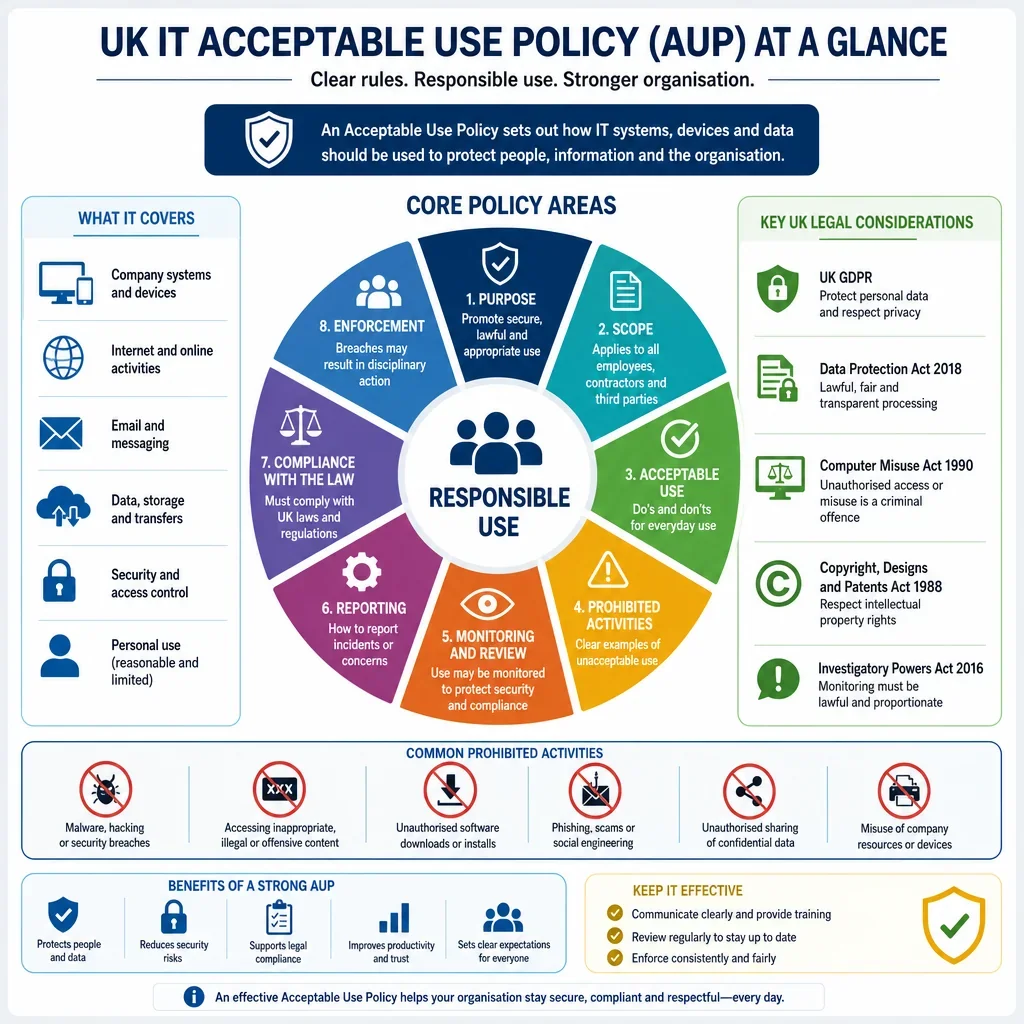
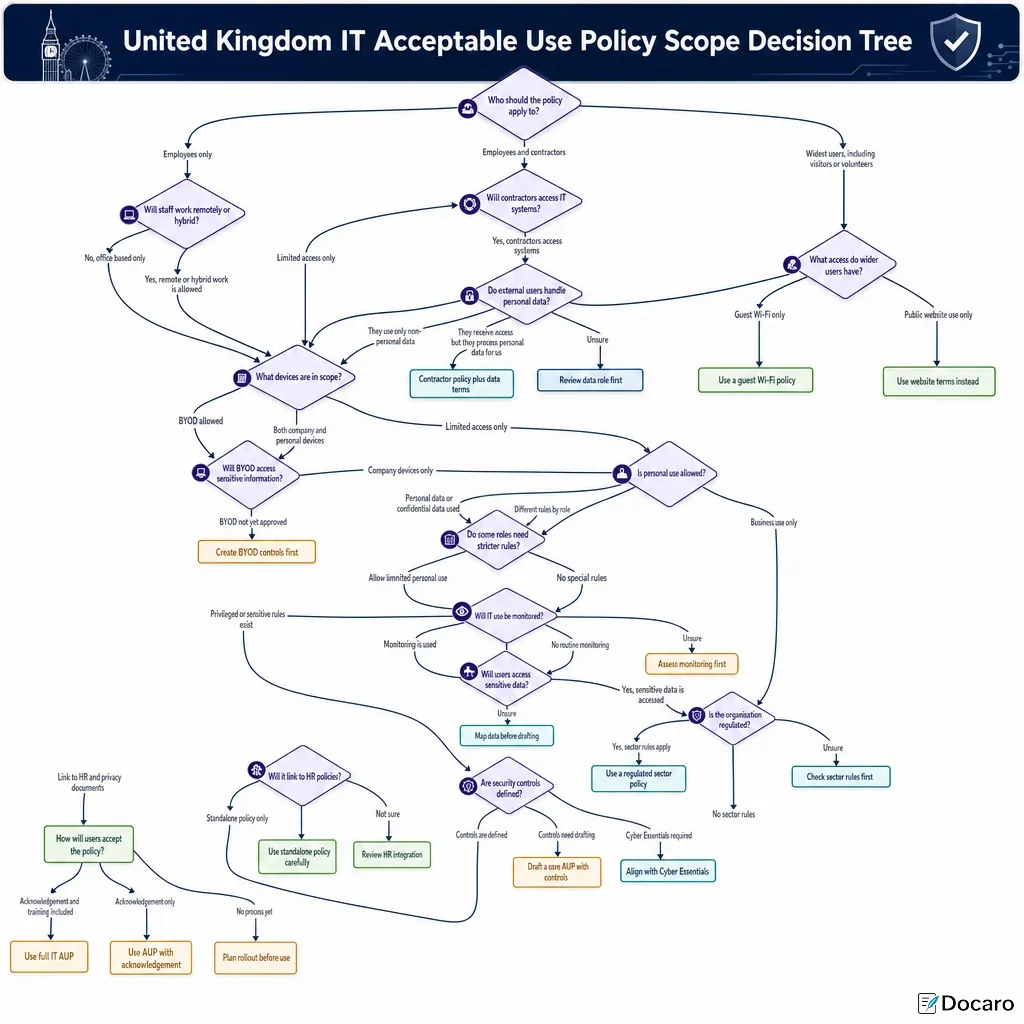
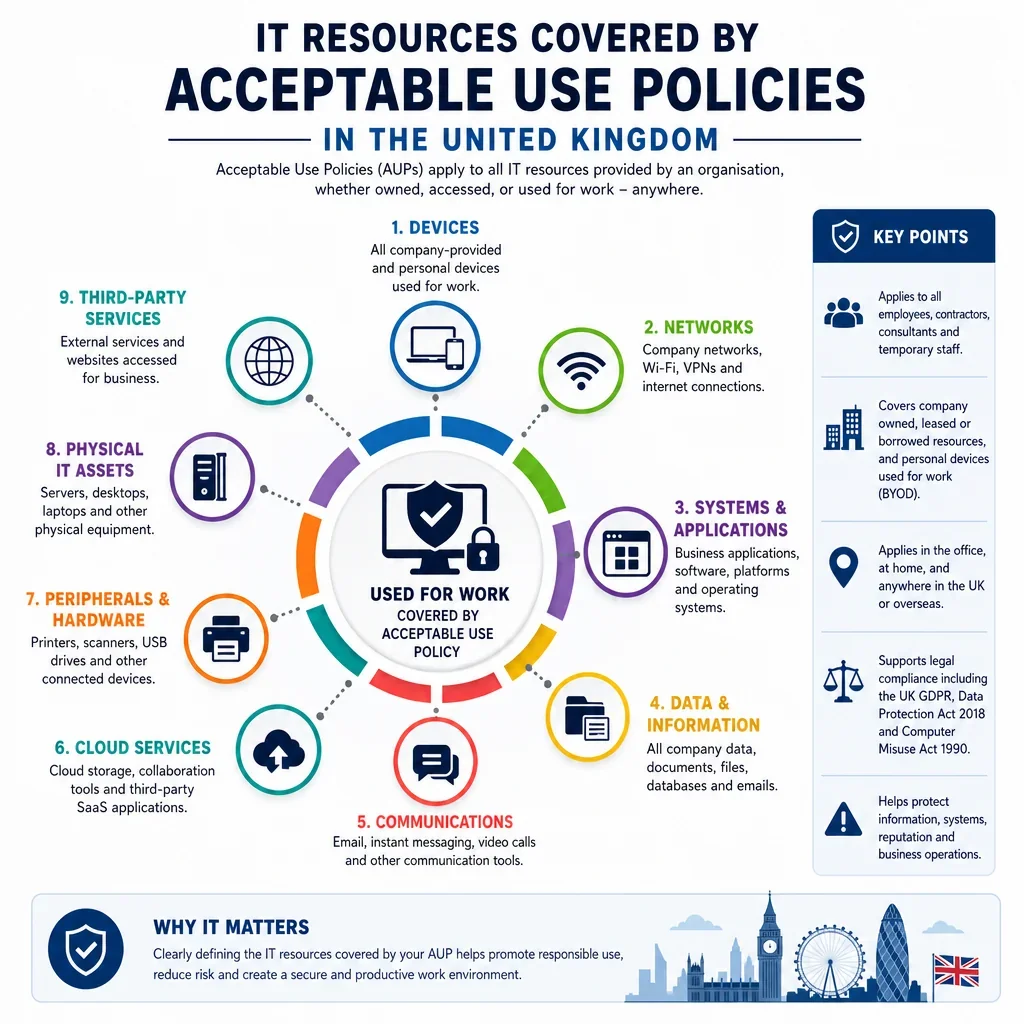
An effective UK Acceptable Use Policy should cover more than laptops and email. The dataset shows that rules normally need to extend across devices, networks, cloud platforms, communications tools, accounts, credentials, removable media, personal devices, AI tools and collaboration systems. This matters because misuse often occurs through everyday resources such as messaging apps, file sharing links, shared mailboxes and remote access services rather than through core business systems alone.
Who Should Own Acceptable Use Controls?
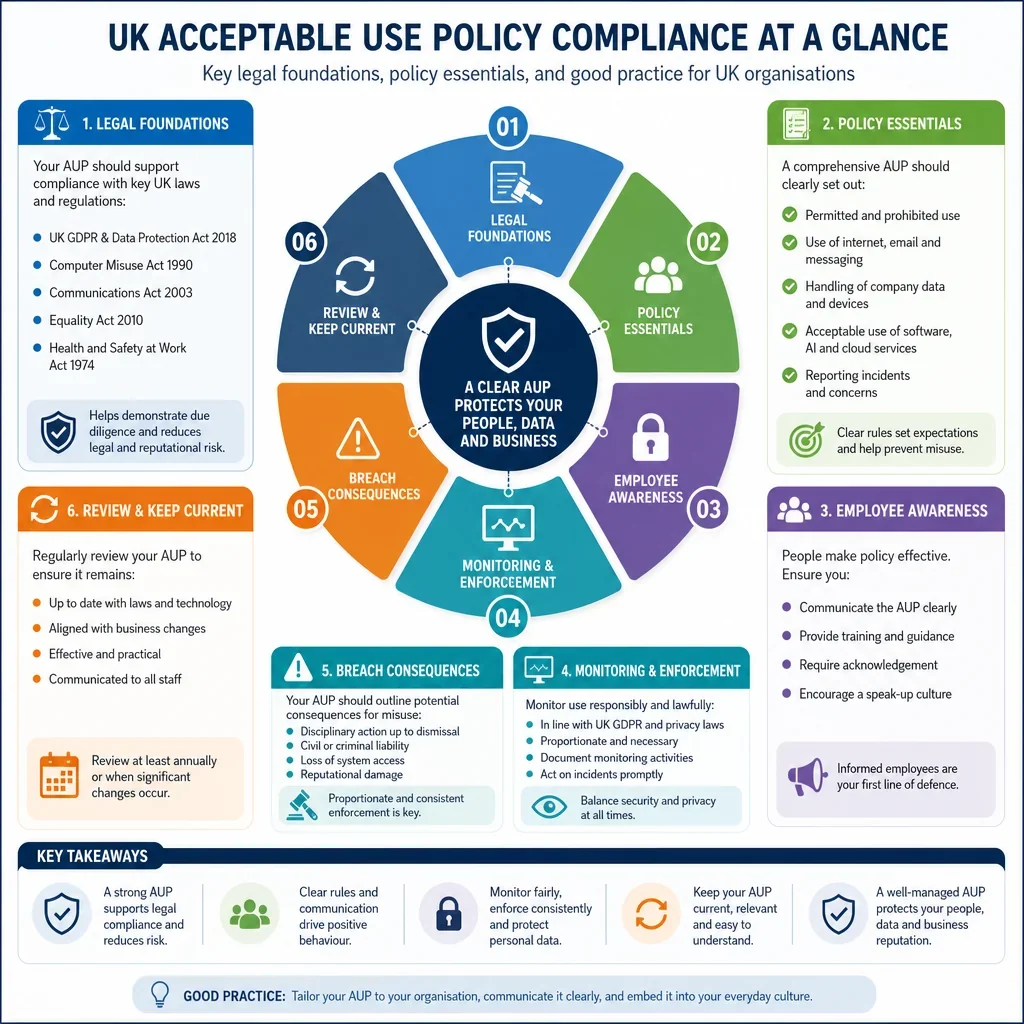
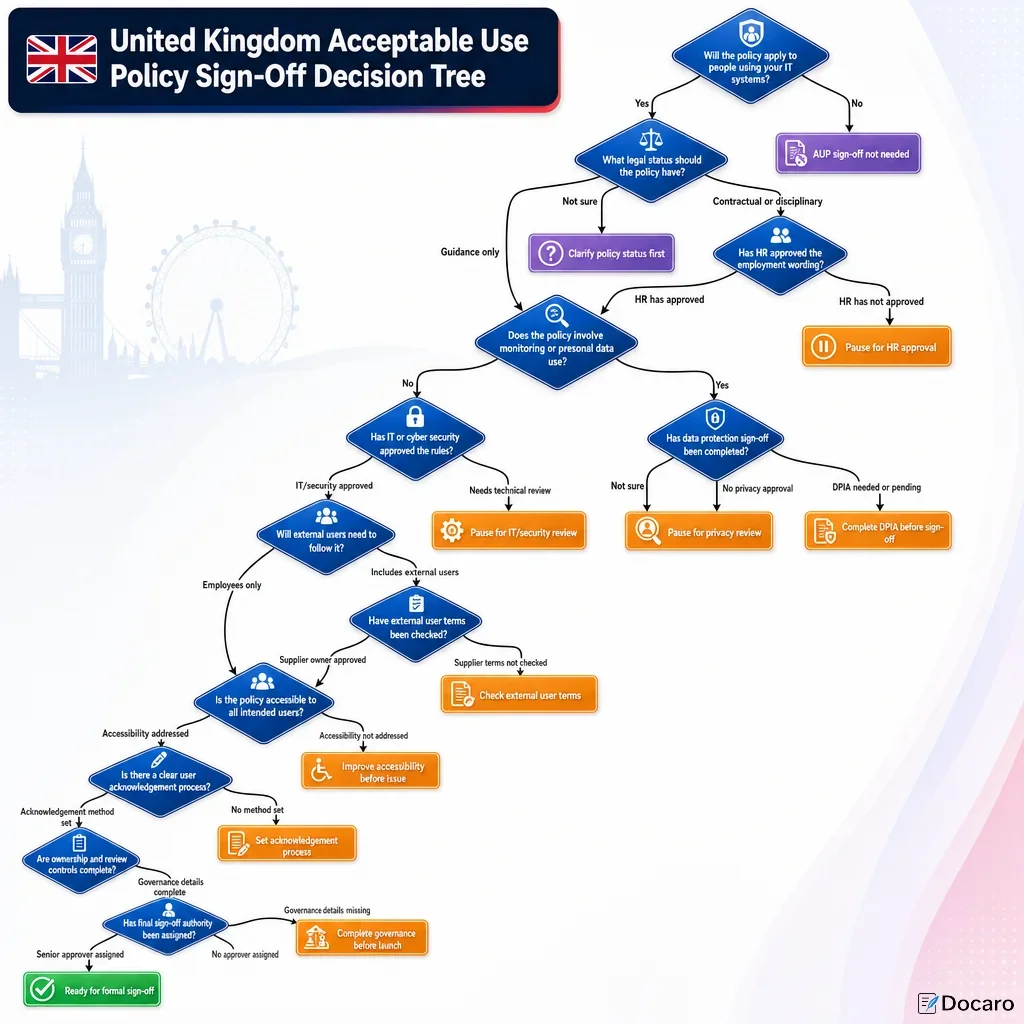
The records show that responsibility is usually split: the IT team manages device, network and access controls; the information security team sets security standards; line managers supervise appropriate business use; and human resources supports conduct and disciplinary processes. UK employers should make these responsibilities explicit so that monitoring, access restrictions and enforcement are consistent and defensible.
Why Do Remote And Hybrid Working Need Specific Rules?
Remote and hybrid contexts create higher dependency on VPNs, home networks, cloud storage, video meetings, MFA, mobile devices and personal equipment. A UK policy should therefore specify what may be accessed off-site, how company data may be stored or shared, and when personal devices or public Wi-Fi may be used. The ICO security guidance is particularly relevant where acceptable use rules protect personal data.
Which UK Legal Issues Are Most Relevant?
Acceptable use rules should be aligned with UK data protection, confidentiality, cyber security and employment obligations. In particular, policies that involve user monitoring should be transparent and proportionate under the ICO employment monitoring guidance. Rules on access credentials, unauthorised access and misuse of systems should also be consistent with the Computer Misuse Act 1990.
What Should Be Restricted In Plain Corporate Terms?
The most useful restrictions are practical and resource-specific. Examples include prohibiting unauthorised software installation, storage of company files in personal cloud accounts, sharing passwords, forwarding business email to private accounts, using unsupported messaging channels for client data, disabling security tools, or connecting unknown USB devices. These are concrete behaviours that employees can understand and managers can enforce.
FAQs
You Might Also Be Interested In