
United Kingdom Acceptable Use Policy Clause Library
Clause Name | Purpose | Typical Importance | Applies To | Example Wording |
|---|---|---|---|---|
Access and authentication | ||||
Individual User Accounts | Ensure each user is accountable for activity on corporate systems. | High | All staff | Users must access corporate systems only through their own allocated account and must not use another person's credentials. |
Password Confidentiality | Prevent unauthorised access caused by shared or exposed passwords. | High | All staff | Users must keep passwords confidential and must not disclose, share, write down insecurely or reuse them in a way that creates security risk. |
Multi-Factor Authentication | Reduce account compromise by requiring an additional authentication factor. | High | All staff | Users must use multi-factor authentication where required and must not attempt to bypass, disable or transfer authentication factors. |
Privileged Account Use | Restrict administrator rights to approved business purposes. | High | Privileged users | Privileged accounts must be used only for authorised administrative tasks and not for ordinary email, browsing or personal activity. |
Screen Locking | Prevent unauthorised access to unattended devices. | High | All staff | Users must lock screens or log off before leaving any device unattended, including when working away from company premises. |
Access Changes And Leavers | Ensure access is amended or removed when roles change or end. | High | Employees only | Users must notify their manager promptly if system access is no longer needed or appears inconsistent with their role. |
Least Privilege Access | Limit access to the minimum needed for the user's role. | High | All staff | Users must access only systems, folders and information that they are authorised to use for their work. |
Authentication Tokens And Passcodes | Protect hardware tokens, authenticator apps and recovery codes. | High | All staff | Users must keep authentication tokens, one-time passcodes and recovery codes secure and must report any loss or suspected compromise immediately. |
Email and messaging | ||||
Shared Mailboxes | Control accountability and access to shared email accounts. | Medium | All staff | Shared mailboxes must be used only by authorised users and in accordance with any role-based permissions or retention requirements. |
Email Attachments | Reduce malware, phishing and accidental disclosure risks. | High | All staff | Users must take care when opening attachments or links and must not open suspicious content or send sensitive attachments without appropriate protection. |
Phishing And Suspicious Messages | Ensure suspicious communications are reported and contained quickly. | High | All staff | Users must report suspected phishing, malicious links, unexpected payment requests or impersonation attempts using the approved reporting process. |
Business Email Use | Set professional standards for corporate email communications. | Medium | All staff | Users must use corporate email professionally and must not send misleading, abusive, discriminatory, unlawful or unauthorised messages. |
Instant Messaging And Collaboration Tools | Apply acceptable use standards to chat and collaboration platforms. | Medium | All staff | Users must use approved messaging and collaboration tools for business communications and must not share confidential information in unauthorised channels. |
External Email Forwarding | Prevent uncontrolled transfer of corporate and personal data. | High | All staff | Users must not automatically forward corporate email to personal or unapproved external accounts unless expressly authorised. |
Bulk Email And Distribution Lists | Prevent spam, disclosure errors and reputational damage. | Medium | All staff | Users must use distribution lists carefully and must check recipients before sending bulk messages or messages containing confidential information. |
Internet use | ||||
Lawful Internet Use | Prohibit unlawful or harmful online activity using company systems. | High | All staff | Users must not use company systems to access, create, store or transmit unlawful, offensive, discriminatory, harassing or harmful material. |
Unsafe Websites | Reduce exposure to malware, scams and credential theft. | High | All staff | Users must avoid websites that are suspicious, unsafe or unrelated to legitimate business purposes where they may expose systems to security risk. |
Prohibited Online Content | Set boundaries for unacceptable online content and conduct. | High | All staff | Users must not access or distribute content that is illegal, pornographic, extremist, discriminatory, abusive or likely to bring the organisation into disrepute. |
Excessive Bandwidth Use | Prevent excessive personal or non-business use affecting systems. | Medium | All staff | Users must not use company networks for excessive streaming, gaming, file sharing or other high-bandwidth activity unless authorised for business purposes. |
Social Media Use | Manage reputational, confidentiality and conduct risks online. | Medium | All staff | Users must not post confidential information, make unauthorised statements on behalf of the organisation or use social media in a way that breaches workplace standards. |
Web Uploads And Forms | Prevent accidental disclosure through online forms and uploads. | High | All staff | Users must not upload company information to websites, portals or online forms unless the destination is approved and the disclosure is authorised. |
Device use | ||||
Company Device Care | Protect company laptops, phones and other equipment from loss or damage. | High | All staff | Users must take reasonable care of company devices and must keep them secure against loss, theft, damage and unauthorised use. |
Bring Your Own Device | Set conditions for using personal devices for work. | High | All staff | Personal devices may be used for work only where approved and must comply with required security, access and remote wipe controls. |
Removable Media | Reduce malware and data loss risks from USB drives and similar media. | High | All staff | Users must not use removable media for company information unless authorised and must protect approved media against loss, malware and unauthorised access. |
Mobile Phones And Tablets | Secure portable devices used to access business systems. | High | All staff | Mobile devices used for work must be protected by a passcode or biometric control and must not be jailbroken, rooted or insecurely configured. |
Lost Or Stolen Devices | Enable rapid containment and breach assessment after device loss. | High | All staff | Users must report lost, stolen or compromised devices immediately so that access can be disabled and any data breach risk assessed. |
Device Encryption | Protect information if a device is lost or stolen. | High | All staff | Users must not disable encryption or other security controls applied to company devices or approved personal devices used for work. |
Unauthorised Peripherals | Prevent risks from unknown hardware connected to company systems. | Medium | All staff | Users must not connect unauthorised storage devices, network equipment or other peripherals to company systems without approval. |
Data handling | ||||
Personal Data Handling | Ensure personal data is handled lawfully, securely and only for authorised work purposes. | High | All staff | Users must handle personal data only as authorised and in accordance with the organisation's data protection policies and procedures. |
Security Of Processing | Require appropriate technical and organisational security measures for personal data. | High | All staff | Users must follow required security measures when accessing, storing, sending or deleting personal data. |
Confidential Information | Protect business secrets, client information and internal records. | High | All staff | Users must keep confidential information secure and must not disclose it except where authorised and necessary for their work. |
Data Classification | Help users apply appropriate handling controls to different information types. | Medium | All staff | Users must classify, label and handle information in accordance with the organisation's approved classification scheme where one applies. |
Secure Data Transfer | Protect information when shared inside or outside the organisation. | High | All staff | Users must use approved secure methods when transferring confidential information or personal data, particularly outside the organisation. |
Cloud Storage And File Sharing | Prevent uncontrolled storage or sharing through unapproved cloud services. | High | All staff | Users must store and share company information only through approved cloud services and must apply access restrictions appropriate to the information. |
Retention And Deletion | Avoid keeping personal data and records longer than needed. | High | All staff | Users must retain, archive and delete records in accordance with approved retention rules and must not keep unnecessary local copies. |
Printing And Hard Copy Records | Reduce disclosure risks from printed documents. | Medium | All staff | Users must collect printed documents promptly and dispose of confidential hard copy records using approved secure disposal methods. |
Personal Data Breach Reporting | Support prompt assessment and notification of personal data breaches. | High | All staff | Users must report any suspected loss, unauthorised disclosure or compromise of personal data immediately through the approved incident process. |
Monitoring and enforcement | ||||
System Monitoring Notice | Inform users that system activity may be monitored for lawful purposes. | High | All staff | The organisation may monitor use of its systems for security, compliance, operational and investigation purposes in accordance with applicable privacy information. |
Proportionate Workplace Monitoring | Ensure monitoring is limited, justified and transparent. | High | All staff | Monitoring will be carried out only where lawful, necessary and proportionate to a legitimate business purpose. |
Audit Logs | Enable detection, investigation and accountability for system activity. | High | All staff | System access and activity may be logged and reviewed to protect systems, investigate incidents and verify compliance with this policy. |
Breach Of Policy | Explain that misuse may result in action under company procedures. | High | Employees only | Breach of this policy may result in access restrictions, investigation and disciplinary action in accordance with the organisation's procedures. |
Contractor Non-Compliance | Provide consequences for non-employee misuse of systems. | Medium | Contractors and consultants | Contractors and consultants who breach this policy may have access withdrawn and the matter may be referred to their employer or contracting party. |
Cooperation With Investigations | Require users to assist reasonable security or compliance investigations. | Medium | All staff | Users must cooperate with reasonable requests relating to security, compliance or misuse investigations, including requests to return devices or provide relevant information. |
Remote working | ||||
Remote Working Security | Apply security controls when working away from company premises. | High | Remote workers | Remote workers must take reasonable steps to protect devices, systems and information when working from home, client sites or public locations. |
VPN And Secure Remote Access | Require approved secure channels for remote access. | High | Remote workers | Remote access to company systems must be made only through approved secure methods such as the organisation's VPN or managed remote access service. |
Public Wi-Fi | Reduce interception and unauthorised access risks on public networks. | Medium | Remote workers | Users must take extra care when using public Wi-Fi and must use approved secure remote access where required. |
Screen Privacy In Public | Prevent shoulder surfing and accidental disclosure in public places. | Medium | Remote workers | Users must position screens to reduce the risk of others viewing confidential information when working in public or shared spaces. |
Home Printing | Control hard copy risks outside the office. | Medium | Remote workers | Users must not print confidential information at home unless necessary and must store and dispose of any printouts securely. |
Household And Third-Party Access | Prevent family members or others using work devices or seeing data. | High | Remote workers | Users must not allow family members, visitors or other third parties to use company devices or access company information. |
Software and downloads | ||||
Approved Software Only | Reduce malware, licensing and support risks from unauthorised software. | High | All staff | Users must install or use only software, applications and browser extensions that have been approved by the organisation. |
Downloads From The Internet | Control downloads that may introduce malware or unwanted software. | High | All staff | Users must not download executable files, scripts, tools or other software from the internet unless the source and purpose are approved. |
Software Licensing | Avoid unlawful copying or use of unlicensed software. | Medium | All staff | Users must not copy, install or use software unless the organisation holds appropriate licences or other permission. |
Security Updates | Ensure devices and applications receive security patches. | High | All staff | Users must not prevent, delay or disable approved security updates, patches or endpoint protection on company systems. |
Open Source Components | Control security and licensing risks in software development. | Medium | Privileged users | Users must use open source packages only in accordance with approved development, security review and licensing procedures. |
Browser Extensions | Prevent browser add-ons from accessing data or weakening security. | Medium | All staff | Users must not install browser extensions or add-ons unless they are approved for business use. |
Security obligations | ||||
Malware Protection | Maintain endpoint protection against viruses and malicious software. | High | All staff | Users must not disable malware protection, firewall settings or security tools installed on company systems. |
Security Incident Reporting | Ensure suspected cyber incidents are reported quickly. | High | All staff | Users must report suspected security incidents, malware, unauthorised access, lost credentials or unusual system behaviour immediately. |
Suspected Credential Compromise | Trigger fast password reset and account containment. | High | All staff | Users must report immediately if they believe a password, token, device or account has been lost, disclosed or compromised. |
No Circumvention Of Security Controls | Prevent users weakening technical protections. | High | All staff | Users must not bypass, disable, alter or test security controls unless expressly authorised to do so as part of their role. |
Physical Security Of IT Assets | Protect equipment and information from physical access risks. | High | All staff | Users must keep laptops, phones, access cards and other IT assets secure and must not leave them unattended in public places or vehicles where avoidable. |
Unauthorised System Changes | Prevent unsupported or risky changes to systems. | High | Privileged users | Users must not alter system configurations, security settings or network connections unless authorised and, where required, approved through change control. |
Vulnerability Reporting | Ensure weaknesses are reported and managed safely. | Medium | All staff | Users who identify a security weakness must report it promptly and must not exploit, publicise or test it without authorisation. |
Personal use | ||||
Limited Personal Use | Permit reasonable personal use while protecting business interests. | Medium | All staff | Reasonable personal use of company systems is permitted only where it is lawful, occasional, does not interfere with work and does not create security or reputational risk. |
Personal Use And Monitoring | Clarify that personal use may still be subject to lawful monitoring. | High | All staff | Users should understand that personal use of company systems may be monitored where lawful and proportionate and in accordance with privacy information provided by the organisation. |
Personal Email Accounts | Prevent business data being handled through personal email. | High | All staff | Users must not send, receive, store or process company information or personal data using personal email accounts unless expressly authorised. |
Personal Cloud Accounts | Prevent uncontrolled copying of business information to personal storage. | High | All staff | Users must not store, synchronise or back up company information to personal cloud storage or personal file-sharing services. |
Personal Subscriptions And Accounts | Avoid mixing personal accounts with company systems and data. | Low | All staff | Users must not use company payment details, email addresses or systems for personal subscriptions unless expressly permitted. |
Personal Device Connections | Reduce risks from connecting personal devices to company equipment. | Medium | All staff | Users must not connect personal devices to company computers or networks except where permitted by the organisation. |
Access and authentication | ||||
Temporary Staff Access | Limit short-term users to approved access for the assignment. | Medium | Temporary staff | Temporary staff must use only the access granted for their assignment and must return devices, credentials and information when the assignment ends. |
Data handling | ||||
Use Of AI Tools | Control risks from entering company or personal data into AI services. | High | All staff | Users must not enter confidential information, personal data or client data into AI tools unless the tool and use case have been approved. |
Email and messaging | ||||
Payment And Bank Detail Requests | Reduce business email compromise and payment diversion fraud. | High | All staff | Users must verify payment instructions, bank detail changes and urgent financial requests through approved independent checks before acting. |
Internet use | ||||
Copyrighted Material | Prevent unauthorised copying, downloading or sharing of protected works. | Medium | All staff | Users must not use company systems to copy, download, stream or distribute copyright material unless permitted by licence or law. |
Security obligations | ||||
Unauthorised Access To Systems | Prohibit hacking, unauthorised access and misuse of systems. | High | All staff | Users must not attempt unauthorised access to any system, account, data or network, whether belonging to the organisation or a third party. |
Email and messaging | ||||
Abusive Or Threatening Communications | Prevent offensive, threatening or abusive electronic communications. | High | All staff | Users must not send messages that are threatening, abusive, grossly offensive, discriminatory, harassing or intended to cause distress. |
Discriminatory Or Harassing Use | Prevent use of systems for discrimination, harassment or victimisation. | High | All staff | Users must not use company systems to discriminate, harass, bully or victimise any person, including on grounds protected by equality law. |
Internet use | ||||
Obscene Or Illegal Images | Prohibit illegal obscene content and safeguard users and systems. | High | All staff | Users must not access, store, create, transmit or distribute obscene, indecent or illegal images or material using company systems. |
Terrorism And Extremist Content | Prohibit accessing or sharing terrorist or extremist material. | High | All staff | Users must not access, download, store or distribute terrorist or extremist material unless expressly authorised for a lawful business purpose. |
Monitoring and enforcement | ||||
Interception And Communications Privacy | Ensure communications monitoring respects legal limits. | High | All staff | Communications monitoring will be carried out only where permitted by law and authorised by the organisation for legitimate purposes. |
Email and messaging | ||||
Business Communications Records | Keep business communications accessible as organisational records. | Medium | All staff | Business communications sent or received using company systems are organisational records and must be stored and managed in approved systems. |
Data handling | ||||
Clear Desk And Clear Screen | Prevent casual viewing or loss of confidential information. | Medium | All staff | Users must keep confidential papers, devices and screens secure when away from their workstation or working in shared areas. |
Use Of Approved Storage Locations | Ensure work data is backed up and recoverable. | High | All staff | Users must save work information in approved storage locations and must not keep the only copy of business data on local devices or removable media. |
Encryption For Sensitive Transfers | Protect sensitive information sent outside controlled systems. | High | All staff | Users must encrypt or otherwise protect sensitive information before sending it externally where required by policy or risk assessment. |
Email and messaging | ||||
Meeting Recording | Control privacy and confidentiality risks from recorded meetings. | Medium | All staff | Users must not record meetings or calls unless authorised and participants have been informed where required. |
Internet use | ||||
Guest Network Use | Separate visitor and unmanaged device traffic from business systems. | Medium | Contractors and consultants | Visitors, contractors and unmanaged devices must use only approved guest network access unless separate access is authorised. |
Security obligations | ||||
Access Cards And Badges | Protect physical access credentials linked to IT and premises security. | Medium | All staff | Users must keep access cards and badges secure, must not lend them to others and must report loss immediately. |
Device use | ||||
Return Of IT Assets | Ensure company equipment and data are returned when access ends. | High | Employees only | Users must return all company devices, media, access cards and information when requested or when their employment or engagement ends. |
Secure Disposal Of Devices And Media | Prevent data recovery from retired devices or media. | High | Privileged users | Devices and media containing company information must be disposed of, reused or transferred only through approved secure processes. |
Software and downloads | ||||
Administrative Tools | Control powerful tools that can alter systems or extract data. | High | Privileged users | Administrative, scanning, remote control or scripting tools may be used only by authorised users for approved business purposes. |
Data handling | ||||
Production Data In Testing | Limit personal or confidential data in non-production environments. | High | Privileged users | Production data must not be copied into test or development environments unless authorised and protected by appropriate controls. |
Remote working | ||||
Remote Support Sessions | Control third-party or internal remote access to devices. | Medium | Remote workers | Users must permit remote support access only through approved tools and only where the support request is expected or verified. |
Data handling | ||||
Photography And Screenshots | Prevent data leakage through photos, screenshots or screen captures. | Medium | All staff | Users must not take or share photographs, screenshots or screen recordings of confidential information unless authorised for a business purpose. |
Security obligations | ||||
Network Scanning And Security Testing | Prevent unauthorised testing that may disrupt systems or breach law. | High | Privileged users | Users must not conduct vulnerability scans, penetration tests or similar activity unless expressly authorised and scoped by the organisation. |
Access and authentication | ||||
Temporary Credentials | Control short-term passwords, guest access and emergency accounts. | Medium | Temporary staff | Temporary credentials must be used only for the approved period and purpose and must not be shared or retained after access ends. |
Personal use | ||||
Separation Of Personal And Business Data | Reduce privacy and retrieval issues on company systems. | Medium | All staff | Users should keep personal files and communications separate from business records and should not store excessive personal material on company systems. |
What Should A UK Acceptable Use Policy Cover?
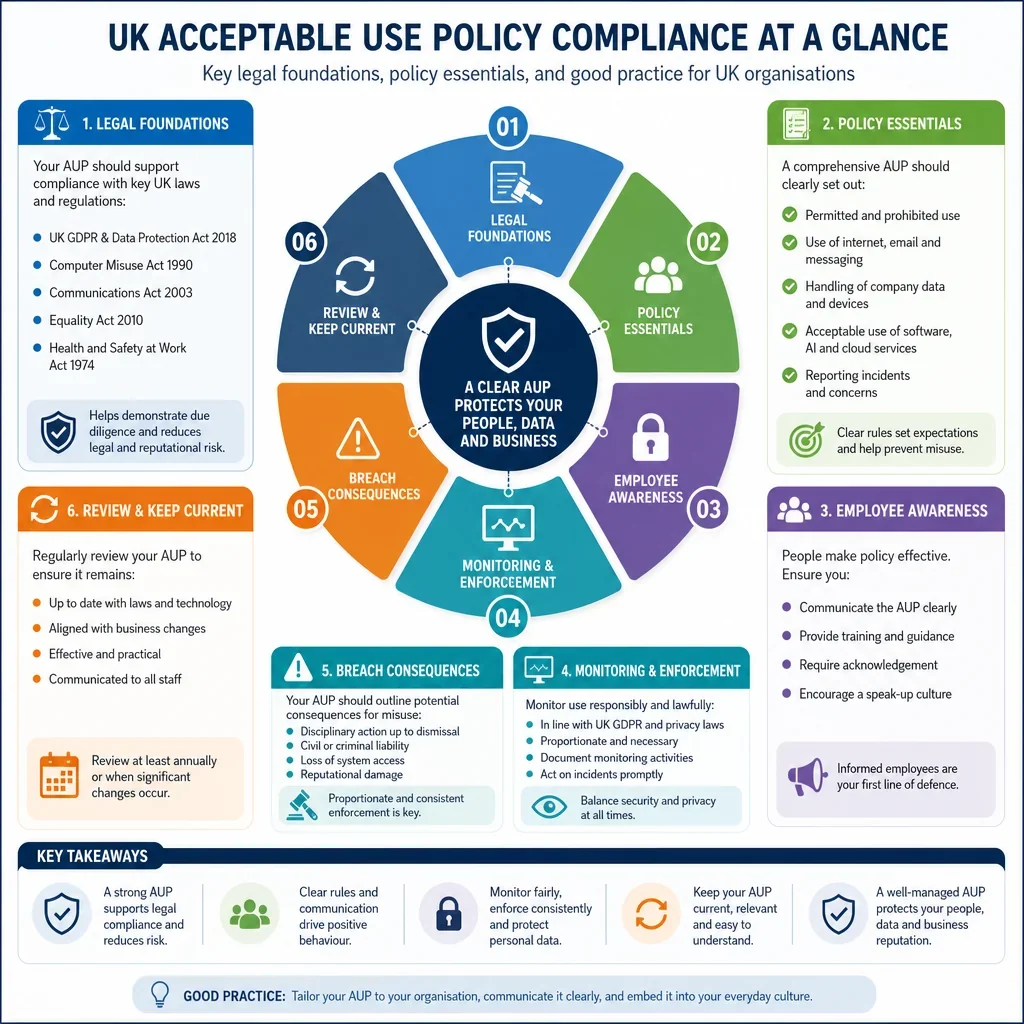
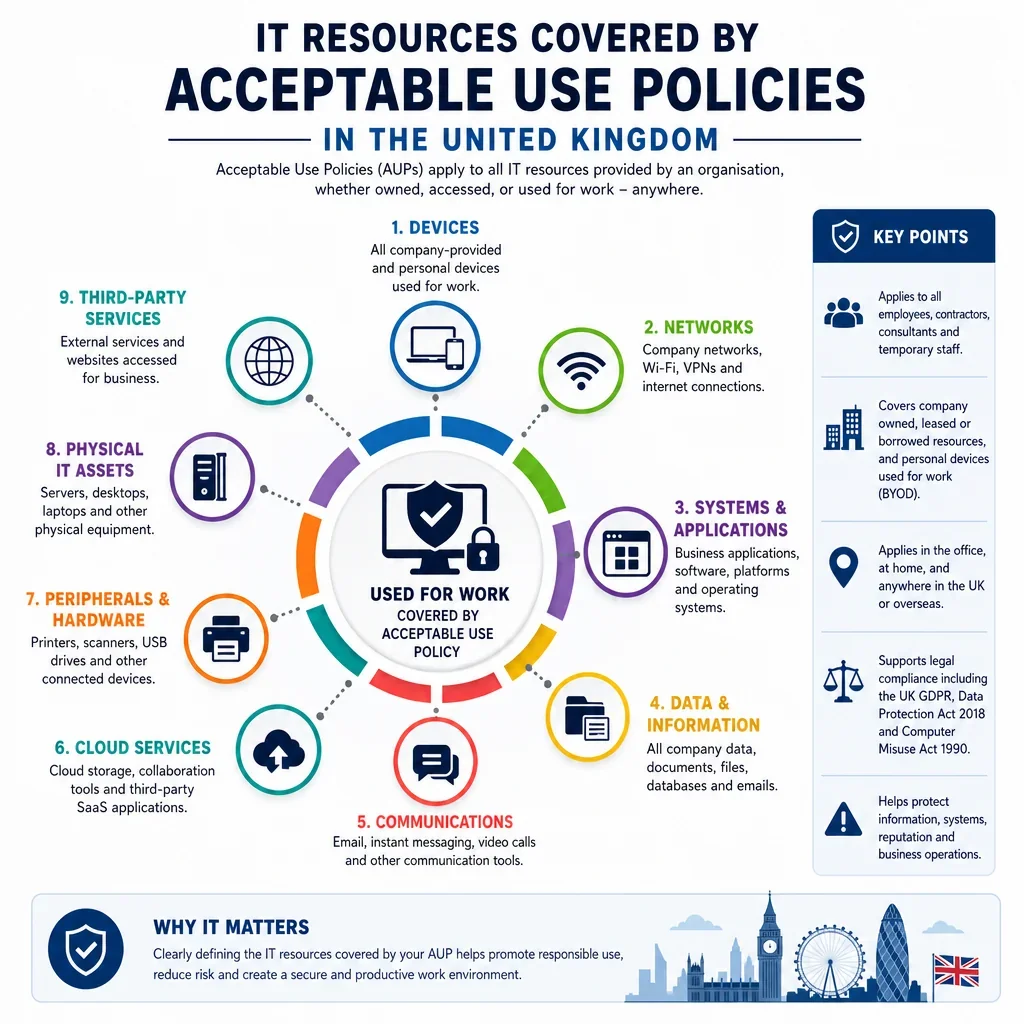
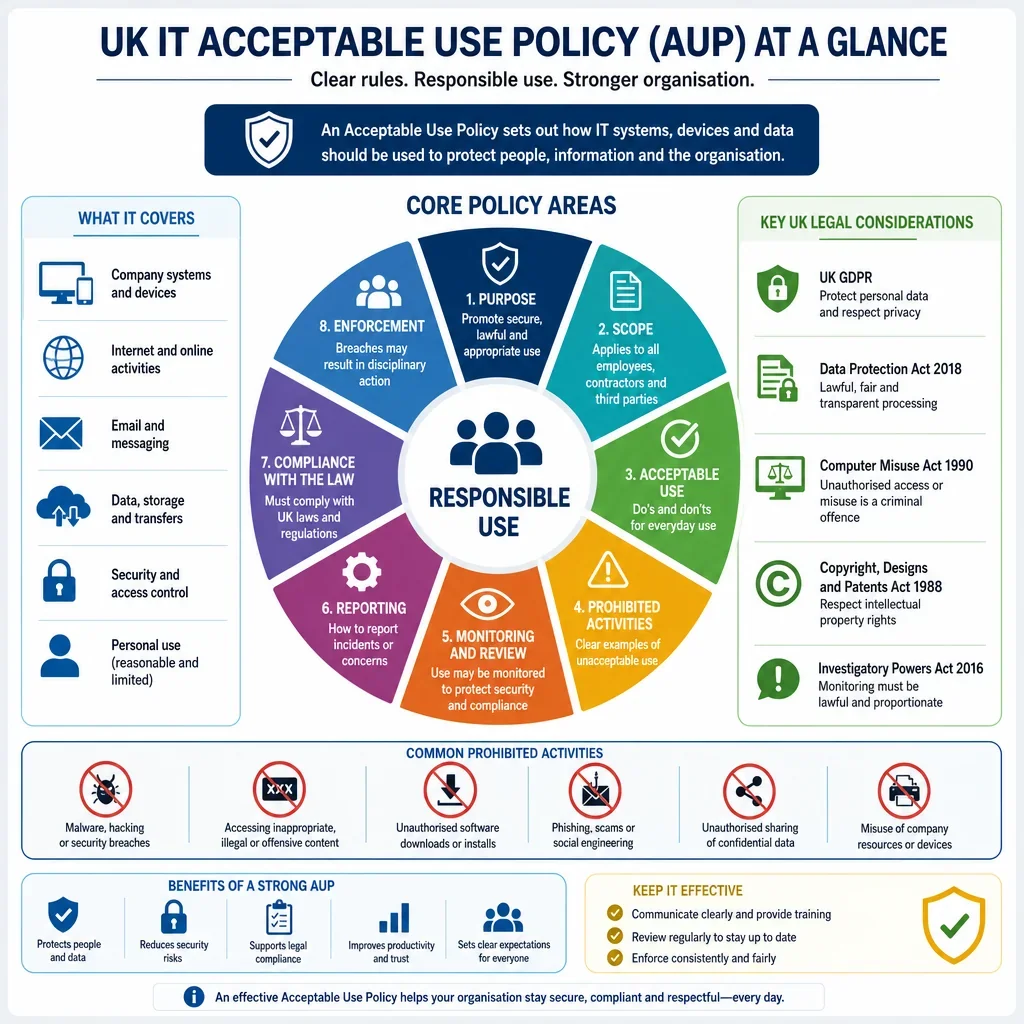
A strong UK acceptable use policy should cover more than basic internet rules. The clause library shows that the highest-priority areas are access control, authentication, data handling, security reporting, monitoring notices, software restrictions, remote working and email use. These areas align with UK data protection expectations, cyber security good practice and common employment risk controls.
How Should Monitoring Be Addressed In An Acceptable Use Policy?
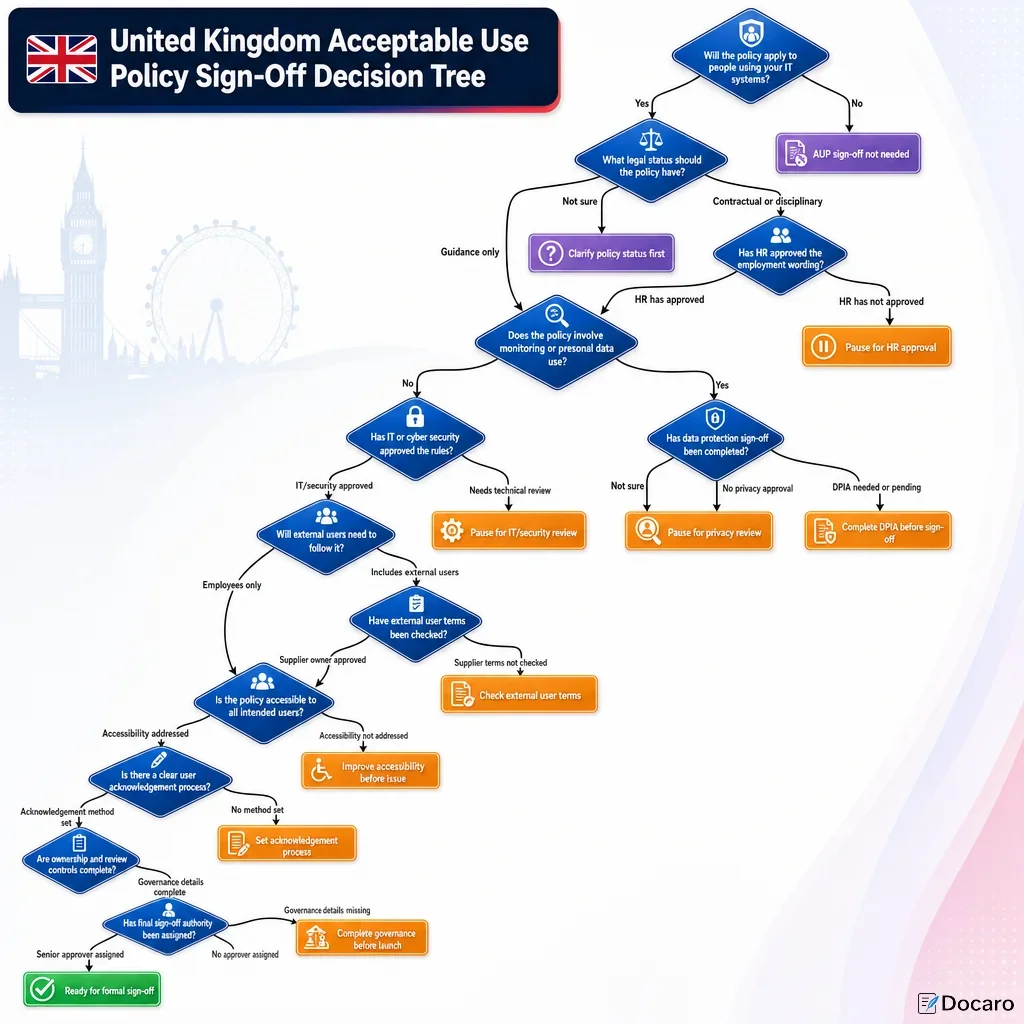
Monitoring clauses should be clear, proportionate and linked to legitimate business purposes such as security, compliance, service management and investigation of misuse. UK employers should explain what may be monitored, why it may be monitored and who may review the information. This supports transparency duties under the UK GDPR and Data Protection Act 2018.
Which Clauses Are Most Important For UK Data Protection Compliance?
The most important data-related clauses are those covering confidential information, personal data, removable media, cloud storage, email attachments, data classification, data transfer, incident reporting and secure disposal. These controls help reduce risks of unauthorised disclosure, loss, malware infection and personal data breaches.
Should Personal Use Be Allowed?
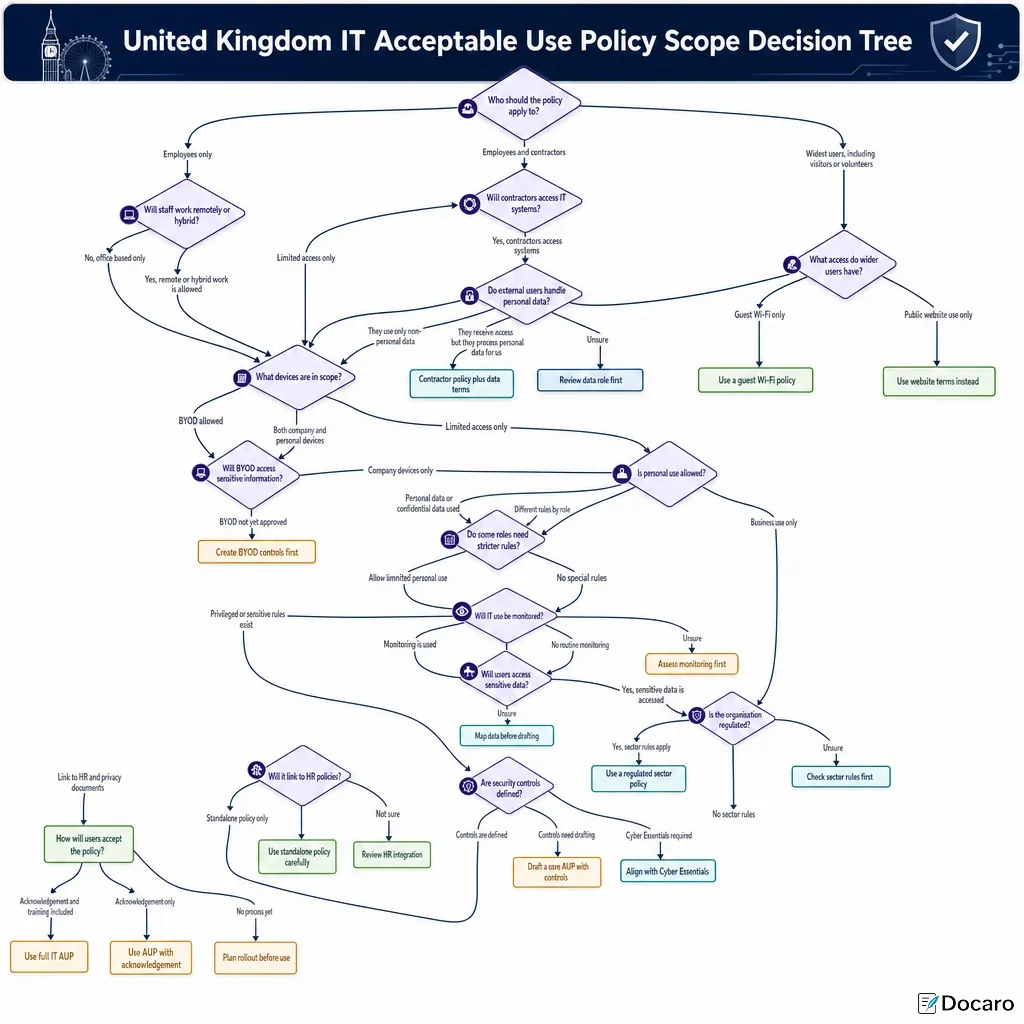
The dataset supports allowing only limited, reasonable personal use where it does not interfere with work, create security risks, breach law or involve offensive, unlawful or excessive activity. If personal use is permitted, the policy should make clear that use of corporate systems may still be monitored in accordance with the organisation's monitoring notice and privacy information.
Who Needs Extra Rules?
Remote workers and privileged users need additional controls. Remote workers should be subject to rules on VPN use, secure Wi-Fi, screen privacy, device storage and reporting lost devices. Privileged users should be subject to stricter rules on administrator accounts, elevated access, segregation of duties, logging and approval of high-risk system changes.
FAQs
You Might Also Be Interested In