
AI Generated Acceptable Use Policy for use in the United States
PDF & Word - 2026 Updated
Docaro Pricing
When Do You Need an Acceptable Use Policy in the United States?
Key Legal Rules for an IT Acceptable Use Policy in the United States
Using the wrong structure for an IT acceptable use policy can fail to adequately protect the organization from liability or enforce compliance.
What a Proper Acceptable Use Policy Should Include
- Clear PurposeState the policy's goal to guide employees on responsible IT resource use while protecting the company.
- Scope of UseDefine which company IT resources, like computers and networks, the policy covers.
- Prohibited ActivitiesList banned actions such as accessing illegal content or sharing confidential information.
- Personal Use RulesExplain limits on using company IT for personal tasks to avoid interference with work.
- Data Security GuidelinesInstruct users to protect sensitive data by using strong passwords and avoiding unsecured networks.
- Email and Communication StandardsSet rules for professional email use, prohibiting harassment or spam.
- Software and Hardware LimitsRestrict installing unapproved software or using personal devices on company networks.
- Monitoring and Privacy NoticeInform employees that the company may monitor IT use and that there's no expectation of privacy.
- Consequences of ViolationsOutline penalties like warnings or termination for breaking the policy.
- Reporting IssuesEncourage reporting of IT misuse or security concerns to the appropriate team.
Generate Your Document in 4 Easy Steps
Why Use Docaro?
 United States
Free Example Acceptable Use Policy Template
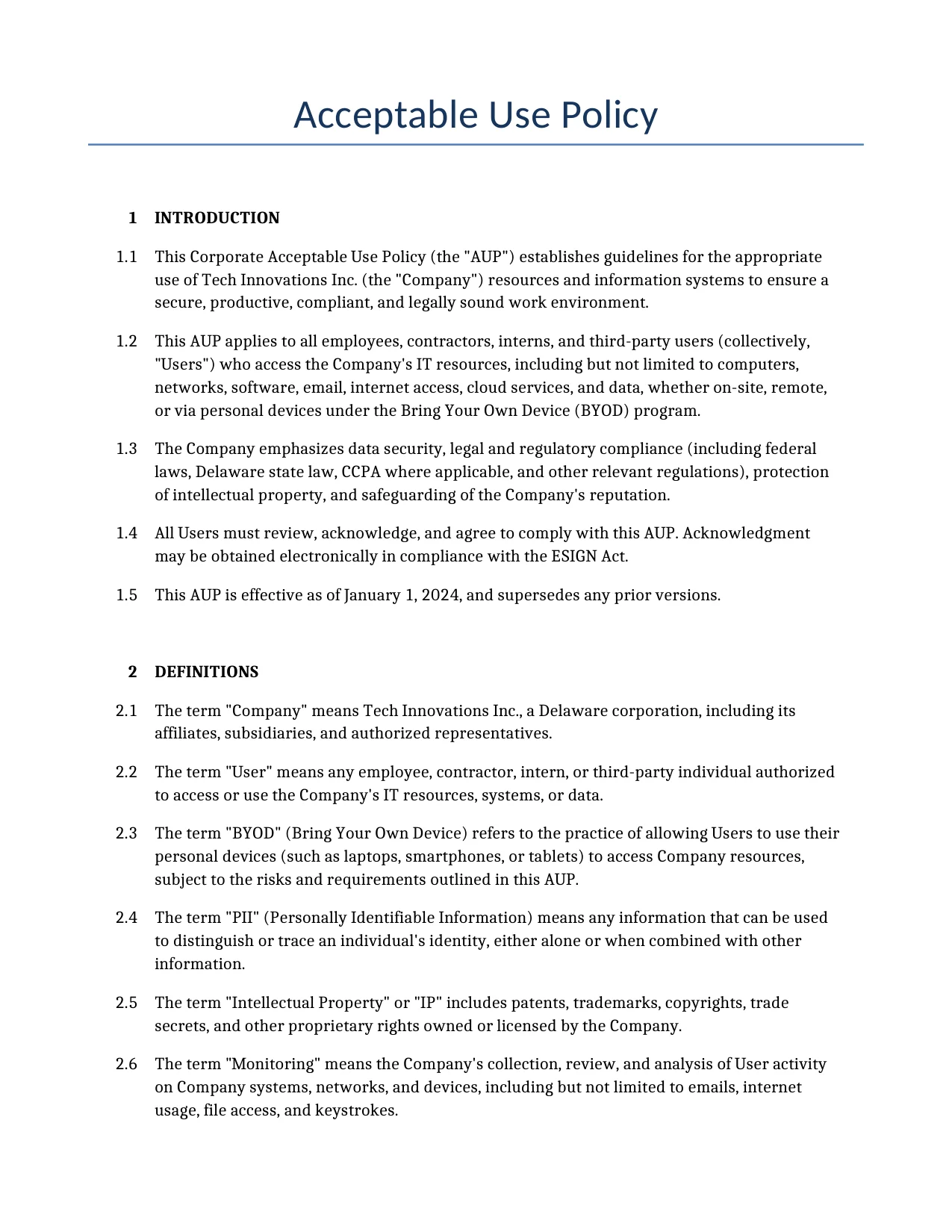
Below is a free template example of a Acceptable Use Policy for use in the United States generated by our AI model.
The clauses in your actual Acceptable Use Policy will vary from this example as they will be entirely bespoke to your requirements as set out in the questionnaire you complete.
Corporate Acceptable Use Policy
1INTRODUCTION
This Corporate Acceptable Use Policy (the "AUP") establishes guidelines for the appropriate use of Tech Innovations Inc. (the "Company") resources and information systems to ensure a secure, productive, compliant, and legally sound work environment.
This AUP applies to all employees, contractors, interns, and third-party users (collectively, "Users") who access the Company's IT resources, including but not limited to computers, networks, software, email, internet access, cloud services, and data, whether on-site, remote, or via personal devices under the Bring Your Own Device (BYOD) program.
The Company emphasizes data security, legal and regulatory compliance (including federal laws, Delaware state law, CCPA where applicable, and other relevant regulations), protection of intellectual property, and safeguarding of the Company's reputation.
All Users must review, acknowledge, and agree to comply with this AUP. Acknowledgment may be obtained electronically in compliance with the ESIGN Act.
This AUP is effective as of January 1, 2024, and supersedes any prior versions.
2DEFINITIONS
The term "Company" means Tech Innovations Inc., a Delaware corporation, including its affiliates, subsidiaries, and authorized representatives.
The term "User" means any employee, contractor, intern, or third-party individual authorized to access or use the Company's IT resources, systems, or data.
The term "BYOD" (Bring Your Own Device) refers to the practice of allowing Users to use their personal devices (such as laptops, smartphones, or tablets) to access Company resources, subject to the risks and requirements outlined in this AUP.
The term "PII" (Personally Identifiable Information) means any information that can be used to distinguish or trace an individual's identity, either alone or when combined with other information.
The term "Intellectual Property" or "IP" includes patents, trademarks, copyrights, trade secrets, and other proprietary rights owned or licensed by the Company.
The term "Monitoring" means the Company's collection, review, and analysis of User activity on Company systems, networks, and devices, including but not limited to emails, internet usage, file access, and keystrokes.
The term "Data Breach" means any unauthorized access, acquisition, disclosure, alteration, or destruction of Company data, including PII or confidential information.
The term "Confidential Information" includes trade secrets, proprietary business information, customer data, PII, financial data, technical specifications, source code, and any other non-public information.
3PURPOSE AND SCOPE
The purpose of this AUP is to define acceptable and unacceptable use of Company resources, protect the Company's information assets, ensure compliance with applicable laws, promote a respectful workplace, and minimize risks associated with IT usage, including BYOD.
This AUP applies to all Users and all Company-owned or managed IT resources, networks, data, and systems, regardless of location. It also applies to personal devices used under the BYOD policy.
Users have no expectation of privacy in their use of Company systems, networks, or data. All activity may be monitored as permitted by law, including under the Electronic Communications Privacy Act and applicable state laws. This includes activity on BYOD devices when accessing Company resources.
4PERMITTED USES
Users are permitted to use Company resources, systems, networks, and data solely for legitimate business purposes, including communication, research, collaboration, data processing, and other work-related activities that support the Company's mission.
Limited, incidental personal use is permitted provided it does not interfere with productivity, consume significant resources, violate this AUP, or expose the Company to risk. Such use must comply with all other provisions of this AUP.
Permitted activities include accessing approved websites for business research, using Company email for professional correspondence, utilizing approved internal tools and software, and remote access via VPN with multi-factor authentication (MFA).
BYOD usage is permitted subject to the Company's BYOD policy, including installation of Company-managed security software, adherence to encryption requirements, and acceptance that Company data on personal devices is subject to the same monitoring and policies as Company devices. Users assume risks associated with using personal devices, including potential data loss or malware exposure.
File sharing is permitted only through Company-approved secure methods, such as encrypted email, approved cloud storage (e.g., Microsoft OneDrive for Business), or internal secure transfer protocols.
All Users must complete mandatory annual training on this AUP and related security practices.
5PROHIBITED USES
Users shall not use Company resources for any illegal, unethical, or unauthorized activities, including but not limited to fraud, theft, hacking, unauthorized crypto mining, or circumvention of security controls.
Users shall not engage in harassment, discrimination, bullying, retaliation, or creation of a hostile work environment based on protected classes under Title VII of the Civil Rights Act, the Americans with Disabilities Act (ADA), the Age Discrimination in Employment Act (ADEA), or other applicable federal, state, or local anti-discrimination laws. This includes transmitting offensive, defamatory, or discriminatory content via Company systems.
Users shall not create, transmit, or distribute malware, viruses, ransomware, or other harmful code. Users shall not engage in excessive personal use that interferes with business operations.
Users shall not infringe on intellectual property rights, including unauthorized copying, distribution, or use of copyrighted materials, trademarks, patents, or trade secrets in violation of the Digital Millennium Copyright Act (DMCA) or other laws.
Users shall not disclose, misuse, or mishandle Confidential Information or PII except as explicitly authorized.
Users shall not use Company resources to engage in unauthorized social media posting, personal blogging, or other external communications that could damage the Company's reputation or disclose Confidential Information without prior approval. All such activities must comply with Company social media guidelines.
Users shall not use generative AI or other AI tools in ways that risk disclosing Confidential Information, infringe IP, create biased or discriminatory outputs, or violate applicable laws or Company policies. Approved AI tools must be used responsibly with proper oversight.
Users shall comply with all U.S. export control laws (including ITAR and EAR) if applicable to their role. Users shall not export, re-export, or transfer controlled information or technology without proper authorization.
6COMPLIANCE WITH LAWS
Users must comply with all applicable federal laws (including but not limited to the Computer Fraud and Abuse Act, DMCA, Wiretap Act, Sarbanes-Oxley Act, and anti-discrimination laws), Delaware state laws, CCPA (for California residents and applicable data), and any other relevant regulations. If the Company handles protected health information, HIPAA compliance is also required.
Users must respect all intellectual property laws, including copyrights, trademarks, patents, and trade secrets. The Company maintains a DMCA takedown process for handling infringement claims.
Users must promptly report any known or suspected violations of laws or this AUP to the designated compliance contact. Whistleblower protections and non-retaliation are provided as required by law, including under Sarbanes-Oxley.
7CONFIDENTIALITY AND DATA PROTECTION
The designated Data Protection Officer is Dr. Emily Carter (email: emily.carter@techinnovations.com). This officer oversees compliance with data protection laws, including CCPA, and best practices aligned with NIST standards.
All Users must protect Confidential Information and PII. Mandatory annual training on data protection is required. New hires must complete training within 30 days.
In the event of a suspected Data Breach, Users must report it immediately (within 24 hours) to the Data Protection Officer. The Company will follow detailed incident response procedures, including investigation, containment, notification to affected individuals and regulators as required by law (e.g., CCPA, Delaware breach notification laws), and documentation.
Confidential data may be shared only with explicit approval, for legal compliance, or under a valid nondisclosure agreement. Third-party vendors handling such data are subject to periodic audits.
Records containing PII or Confidential Information shall be retained only as long as necessary or as required by law (following Delaware and federal retention schedules) and securely disposed of thereafter using methods compliant with applicable standards.
8INTELLECTUAL PROPERTY
All work product, inventions, software, writings, or other IP created by Users during employment or using Company resources is considered work made for hire and is the exclusive property of the Company. Users assign all rights to the Company.
Users shall not infringe third-party IP rights, including copyrights, trademarks, or patents. Unauthorized use, reproduction, or distribution is prohibited.
The Company maintains procedures for DMCA takedown notices, trademark protection, and patent compliance. Users must report any suspected IP infringement immediately.
Users are prohibited from reverse engineering, decompiling, or otherwise attempting to derive source code from Company technologies.
9SECURITY RESPONSIBILITIES
Users must follow all security protocols, including using strong passwords (minimum 12 characters with complexity), enabling MFA, and not reusing passwords. Passwords must be changed every 90 days or as required by policy.
Users must report any suspected security incidents, vulnerabilities, or Data Breaches to the IT Security Manager (John Doe, security@techinnovations.com) within 24 hours.
Users shall not install unauthorized software, disable security features, or bypass controls. Company devices must use full-disk encryption. BYOD devices accessing Company data must meet equivalent security standards.
The Company maintains an incident response plan aligned with NIST guidelines, including logging, monitoring, and breach notification procedures compliant with federal and state laws.
10MONITORING AND SURVEILLANCE
The Company monitors and audits all use of its systems, networks, email, internet access, and data for security, compliance, productivity, and legal purposes. Users have no expectation of privacy in these activities, including on BYOD devices when connected to Company resources. Monitoring complies with the Wiretap Act, Electronic Communications Privacy Act, and applicable state laws.
Audits of access logs, resource usage, and communications may occur periodically or as needed. The IT Security Team and Compliance Officers are authorized to conduct such activities.
Monitoring data and audit logs will be retained for a minimum of 12 months or as required by law (e.g., for compliance with Sarbanes-Oxley, breach investigation requirements, or Delaware records retention rules).
This policy serves as notice to all Users that their activities may be monitored without further notice.
11ENFORCEMENT
Violations of this AUP will be investigated promptly and fairly. Enforcement aligns with Delaware at-will employment principles for employees. The Company may suspend access, restrict privileges, or take other interim measures during investigation.
For violations involving legal risks, potential criminal activity, or significant harm, the matter will be escalated immediately to the Compliance Officer, senior management, and/or law enforcement as appropriate.
Investigation records will be retained for at least 12 months or as required by law.
12DISCIPLINARY ACTIONS
Disciplinary actions for violations are progressive and may include verbal warning, written warning, mandatory retraining, suspension of access or employment, termination, and/or legal action. Examples of minor violations include excessive personal use; severe violations include harassment, data breaches, or IP theft, which may result in immediate termination.
Users subject to disciplinary action will have an opportunity to appeal through the Company's established HR appeal process, except in cases of at-will termination under Delaware law.
The Company reserves the right to pursue civil or criminal remedies as appropriate.
13REPORTING MECHANISMS
Users are encouraged to report suspected violations, security incidents, discrimination, harassment, or compliance issues promptly via email (compliance@techinnovations.com), phone ((555) 123-4567), online anonymous form, or in person. The primary contact is Jane Smith, Chief Compliance Officer.
Reports will be investigated confidentially by the Internal Compliance Team and/or Legal Department, commencing within 48 hours and typically completed within 30 business days. The Company provides strong non-retaliation protections for good-faith reports, consistent with Sarbanes-Oxley, anti-discrimination laws, and other requirements. Whistleblower protections apply.
Anonymous reporting is permitted where feasible. Acknowledgment of receipt will occur within 24 hours. Appeal rights are available for certain decisions.
14TRAINING AND AWARENESS
The Company requires interactive annual training for all Users on this AUP, data security, anti-harassment/discrimination, privacy, and acceptable use. New hires must complete training within 30 days. Training includes online modules, quizzes for comprehension tracking, and periodic in-person workshops. Sessions are approximately 2 hours.
The Human Resources Department administers, tracks completion for auditability, and maintains records of training. Failure to complete required training may result in disciplinary action.
15POLICY UPDATES
The Company may update or revise this AUP as needed to reflect changes in laws, technology, or business practices. The Legal Department, in consultation with IT Security and Compliance teams, is responsible for reviews (at least annually) and amendments.
Users will receive at least 30 days' notice of material changes via email and Company intranet posting. Users must acknowledge receipt and acceptance of updates, which may be electronic.
Continued use of Company resources after updates constitutes acceptance. Urgent changes required for legal compliance may take effect immediately with notice.
16GOVERNING LAW
This AUP shall be governed by and construed in accordance with the laws of the State of Delaware and applicable federal laws of the United States, without regard to conflict of laws principles.
Any disputes arising from this AUP shall be resolved exclusively in the state or federal courts located in Wilmington, Delaware. Users consent to the personal jurisdiction of such courts.
17SEVERABILITY
If any provision of this AUP is held invalid, illegal, or unenforceable by a court of competent jurisdiction, the remaining provisions shall remain in full force and effect.
The invalid provision shall be reformed to the minimum extent necessary to make it valid, legal, and enforceable while preserving its original intent.
18ENTIRE AGREEMENT
This AUP, together with any referenced policies (such as the BYOD Policy or Information Security Policy), constitutes the entire agreement between the Company and Users regarding acceptable use of IT resources and supersedes all prior or contemporaneous understandings, representations, or agreements.
19LIMITATION OF LIABILITY AND DISCLAIMER
The Company disclaims all warranties regarding the availability, reliability, or security of its IT resources. In no event shall the Company be liable for any indirect, incidental, special, or consequential damages arising from use or inability to use Company resources, except as prohibited by law.
This disclaimer does not limit the Company's liability for its own gross negligence or willful misconduct.
20ACKNOWLEDGMENT
By accessing or using Company resources, Users acknowledge that they have read, understood, and agree to comply with all terms of this AUP. Electronic acceptance (such as clicking "I Agree" or electronic signature) is valid and binding under the ESIGN Act and Delaware law.
Users further acknowledge the no-expectation-of-privacy notice, training requirements, and consequences of non-compliance.
21SIGNATURE
By signing below, the User acknowledges receipt, understanding, and agreement to comply with all terms and conditions of this Corporate Acceptable Use Policy.
User Name: _______________________________
Signature: _______________________________ Date: ________________
On behalf of Tech Innovations Inc.:
Authorized Representative Name: _______________________________
Signature: _______________________________ Date: ________________
This example shows approximately 70% of a typical document and is provided for illustrative purposes only. The remaining content has been omitted.
Every document generated by Docaro is tailored to your specific circumstances, jurisdiction and the information you provide. The completed document includes all applicable clauses and provisions required for your situation.
To generate the full, personalised document, answer a short series of questions and your document will be created instantly.