
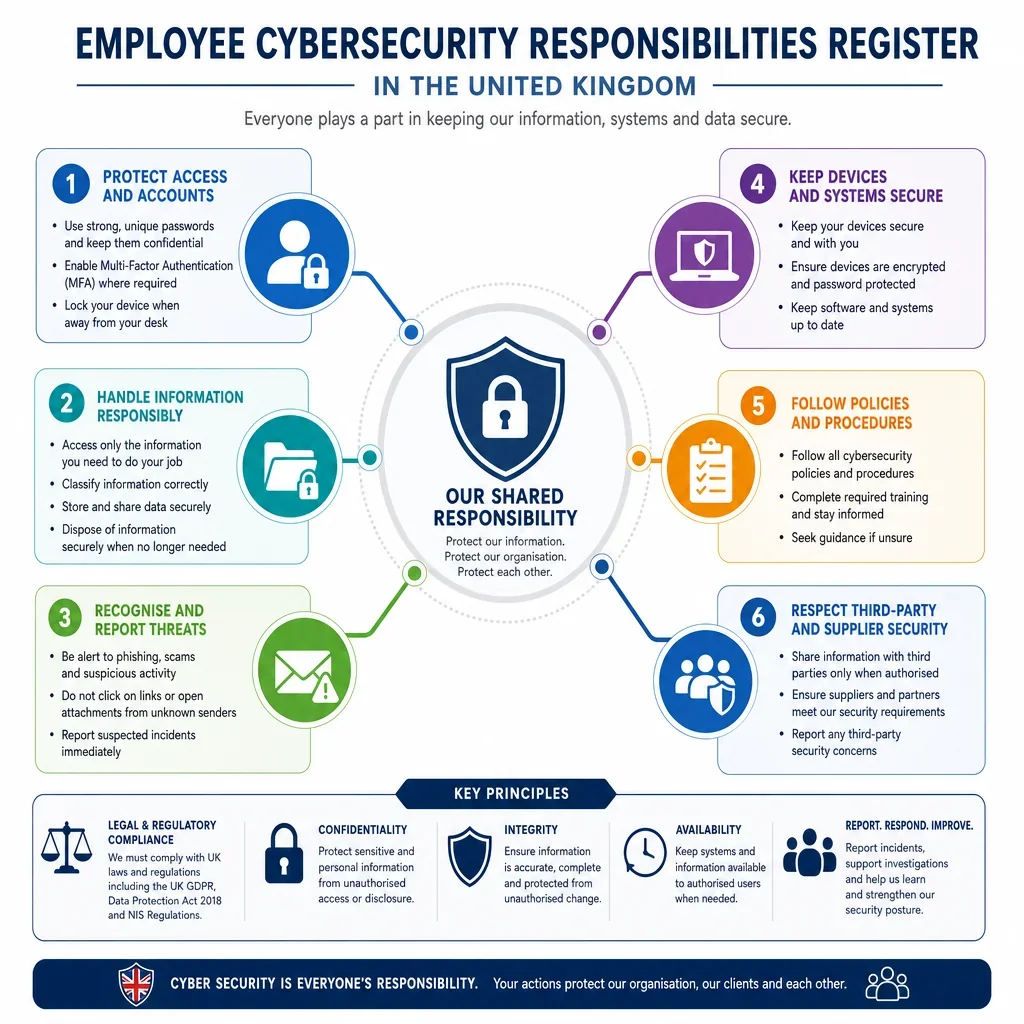
Employee Cybersecurity Responsibilities Register In The United Kingdom
Responsibility Name | Responsibility Description | Security Domain | Frequency | Policy Wording Notes |
|---|---|---|---|---|
All Staff, Contractors | ||||
Use Strong Unique Passwords | Create passwords that are hard to guess and not reused across work and personal accounts. | Password Security | Daily | State that work passwords must be unique, confidential and not reused on non-work services. |
Keep Passwords Confidential | Do not share, write down visibly, email or message passwords to anyone. | Password Security | Daily | Include a clear prohibition on password sharing, including with managers or IT support. |
All Staff, IT Staff, Contractors | ||||
Use Approved Password Managers | Store work passwords only in an approved password manager where provided. | Password Security | Daily | Name the approved tool and ban storage in browsers, notes files or spreadsheets unless approved. |
All Staff, Contractors, Senior Leadership | ||||
Use Multi-Factor Authentication | Use MFA for business systems and never approve unexpected authentication prompts. | Password Security | Daily | Require MFA where available and require suspicious MFA prompts to be reported immediately. |
All Staff, Contractors | ||||
Report Suspected Credential Compromise | Report immediately if a password, token or MFA device may have been exposed. | Password Security, Incident Reporting | As Required | Set a no-blame reporting route and require urgent password reset and IT notification. |
Lock Devices When Unattended | Lock computers, phones and tablets whenever they are left unattended. | Device Use, Physical Security | Daily | Require manual locking and automatic screen lock after a short inactivity period. |
Use Approved Devices Only | Access company systems only from authorised, managed or expressly approved devices. | Device Use, Remote Working | Daily | Define whether personal devices are prohibited or allowed only under BYOD controls. |
All Staff, IT Staff, Contractors | ||||
Install Security Updates Promptly | Allow approved updates and restarts so devices remain protected against known vulnerabilities. | Device Use | As Required | Require users not to disable updates and to restart devices when prompted by IT. |
Do Not Disable Security Tools | Do not disable antivirus, endpoint protection, firewall, monitoring or device management tools. | Device Use | Daily | Make disabling security controls a disciplinary matter unless authorised for support purposes. |
All Staff, Contractors | ||||
Avoid Unauthorised Software | Install or use only software, apps, extensions and AI tools approved for business use. | Device Use, Data Handling | As Required | Require prior approval for new tools, browser extensions and cloud services handling work data. |
All Staff, IT Staff, Contractors | ||||
Control Removable Media | Use USB drives, external disks and memory cards only where approved and encrypted. | Device Use, Data Handling | As Required | Ban unapproved removable media and require encryption for any authorised portable storage. |
All Staff, Contractors | ||||
Report Lost Or Stolen Devices | Report lost or stolen laptops, phones, access cards or storage media immediately. | Device Use, Incident Reporting, Physical Security | As Required | Require immediate reporting to IT and the line manager, including out-of-hours contact details. |
Check For Phishing Indicators | Check unexpected emails, links, attachments and requests before acting. | Email and Messaging | Daily | Tell users to pause, verify the sender and report suspicious messages without clicking links. |
Report Suspicious Messages | Report suspicious emails, texts, calls, QR codes or collaboration messages using the approved route. | Email and Messaging, Incident Reporting | As Required | Provide a report button or mailbox and allow staff to forward scams to report@phishing.gov.uk where appropriate. |
Handle Attachments Safely | Open attachments only when expected, business-related and from a trusted source. | Email and Messaging, Device Use | Daily | Require users to verify unexpected attachments and never enable macros unless expressly approved. |
All Staff, HR Staff, Finance Staff | ||||
Verify Sensitive Email Recipients | Check recipients, attachments and addresses before sending personal, confidential or financial information. | Email and Messaging, Data Handling | Daily | Require double-checking for external recipients and extra checks for bulk or special category data. |
Finance Staff, Managers, Senior Leadership | ||||
Verify Payment Change Requests | Confirm bank detail or payment instruction changes through a trusted independent channel. | Email and Messaging, Data Handling | As Required | Require call-back verification using known contact details, not details in the request message. |
All Staff, Contractors | ||||
Use Approved Messaging Channels | Discuss work matters and share files only through approved email and messaging platforms. | Email and Messaging, Data Handling | Daily | List approved channels and restrict use of personal messaging apps for business information. |
All Staff, Managers, Contractors | ||||
Classify Information Correctly | Apply the correct information classification before storing, sharing or disposing of data. | Data Handling | Daily | Define classification levels and link each level to handling, storage and sharing controls. |
All Staff, HR Staff, Managers, Contractors | ||||
Handle Personal Data Lawfully | Use personal data only for authorised business purposes and in line with privacy notices. | Data Handling | Daily | Refer to UK GDPR principles of lawfulness, fairness, transparency, purpose limitation and security. |
All Staff, HR Staff, Finance Staff, Managers | ||||
Minimise Personal Data Use | Collect, access and share only the personal data needed for the task. | Data Handling | Daily | Require staff to avoid unnecessary copies, downloads, exports and excessive recipient lists. |
HR Staff, Managers, All Staff | ||||
Protect Special Category Data | Apply extra care to health, biometric, racial, trade union, sexual orientation and similar sensitive data. | Data Handling | As Required | Require restricted access, approved storage and DPO or privacy lead consultation where uncertain. |
All Staff, Contractors, HR Staff, Finance Staff | ||||
Share Confidential Information Securely | Use approved secure transfer methods for confidential, personal, commercial or regulated data. | Data Handling, Email and Messaging | As Required | Specify approved encryption, portals, access links and expiry controls for secure sharing. |
All Staff, Contractors, Managers | ||||
Access Data On A Need-To-Know Basis | Access systems and files only when needed for authorised work duties. | Data Handling, Password Security | Daily | Prohibit browsing colleague, customer or payroll records without a business reason. |
All Staff, HR Staff, Finance Staff, Managers | ||||
Keep Personal Data Accurate | Update or flag inaccurate personal data discovered during work activities. | Data Handling | As Required | Require staff to correct records or notify the data owner when inaccuracies are identified. |
Follow Retention And Disposal Rules | Keep records only as long as required and dispose of them securely when due. | Data Handling, Physical Security | Periodic Review | Link to the retention schedule and require secure deletion or confidential shredding. |
All Staff, Contractors | ||||
Maintain A Clear Desk | Keep papers, notebooks, access cards and portable media secure when not in use. | Physical Security, Data Handling | Daily | Require confidential material to be locked away when desks are unattended or offices close. |
All Staff, HR Staff, Finance Staff | ||||
Use Secure Printing | Collect printed material promptly and use secure print release for confidential documents. | Data Handling, Physical Security | As Required | Require staff not to leave printouts, scans or copies unattended on shared devices. |
All Staff, Contractors, Senior Leadership | ||||
Protect Work Information When Remote | Work where screens and calls cannot be easily seen or overheard by unauthorised people. | Remote Working, Physical Security, Data Handling | Daily | Require privacy screens or discretion in public places and secure storage at home. |
All Staff, Contractors, IT Staff | ||||
Use Secure Network Connections | Use approved VPN, secure Wi-Fi and company guidance when accessing systems remotely. | Remote Working, Device Use | Daily | Specify VPN requirements and prohibit insecure public Wi-Fi unless protected by approved controls. |
All Staff, Contractors | ||||
Secure Home Wi-Fi For Work | Use strong Wi-Fi passwords and follow company guidance for home network security. | Remote Working, Password Security | Periodic Review | Advise changing default router passwords and keeping home router firmware updated where possible. |
All Staff, Senior Leadership, Contractors | ||||
Avoid Sensitive Work In Public Places | Do not handle highly confidential or sensitive data where it may be observed or overheard. | Remote Working, Physical Security, Data Handling | As Required | Restrict sensitive calls, board papers, payroll data and client files in cafés, trains and shared spaces. |
All Staff, Contractors, Managers | ||||
Report Security Incidents Immediately | Report suspected cyber incidents, data breaches, malware, fraud or unauthorised access without delay. | Incident Reporting | As Required | Define examples, contacts, out-of-hours escalation and a requirement not to investigate alone. |
All Staff, Managers, HR Staff, IT Staff | ||||
Escalate Personal Data Breaches | Escalate any accidental or unlawful loss, disclosure, alteration or access to personal data immediately. | Incident Reporting, Data Handling | As Required | Refer to the ICO 72-hour notification window and require immediate internal escalation. |
All Staff, IT Staff, Managers | ||||
Preserve Incident Evidence | Do not delete suspicious emails, logs, files or devices unless instructed by IT or incident leads. | Incident Reporting, Device Use | As Required | Tell staff to disconnect only if instructed and to preserve messages, screenshots and timestamps. |
Managers | ||||
Escalate Team Security Concerns | Managers must escalate team-reported security concerns and ensure staff know reporting routes. | Incident Reporting | As Required | Make managers responsible for prompt escalation, not for filtering out uncertain reports. |
All Staff, Contractors | ||||
Wear And Protect Access Badges | Use assigned access badges properly and report lost, stolen or borrowed badges immediately. | Physical Security, Incident Reporting | Daily | Prohibit badge sharing and require lost passes to be disabled without delay. |
All Staff, Contractors, Managers | ||||
Challenge Or Report Unauthorised Visitors | Follow visitor procedures and report tailgating or unknown people in restricted areas. | Physical Security, Incident Reporting | Daily | Require visitors to be signed in, escorted where needed and visibly identified. |
All Staff, Contractors | ||||
Complete Security Induction | Complete required cybersecurity and data protection induction before accessing key systems. | Password Security, Email and Messaging, Data Handling, Incident Reporting | On Joining | Require completion of induction and acceptance of the Information Security Policy on joining. |
All Staff, Contractors, Managers | ||||
Complete Security Refresher Training | Complete periodic training on phishing, data handling, passwords and incident reporting. | Password Security, Email and Messaging, Data Handling, Incident Reporting | Periodic Review | Set training frequency and require completion records for employees and relevant contractors. |
Managers, HR Staff, IT Staff | ||||
Review Access When Roles Change | Ensure system access is changed, reduced or removed when job duties change. | Password Security, Data Handling | As Required | Require HR and managers to notify IT of movers before or on the effective date. |
Managers, HR Staff, IT Staff, Contractors | ||||
Remove Access For Leavers | Disable accounts, recover assets and remove access when employment or engagement ends. | Password Security, Device Use, Data Handling, Physical Security | When Leaving | Specify same-day account disabling, asset return, pass return and mailbox or data handover steps. |
All Staff, Contractors | ||||
Return Company Assets | Return laptops, phones, tokens, access cards, documents and storage media when requested or leaving. | Device Use, Physical Security, Data Handling | When Leaving | Require all information assets to be returned before final day or contract end where possible. |
IT Staff | ||||
Use Privileged Access Carefully | Use administrator rights only when needed and only through approved privileged accounts. | Password Security, Device Use, Data Handling | Daily | Require separate admin accounts, MFA, logging and no routine use of admin rights for email or browsing. |
Maintain Patch Management | Identify, test and deploy security patches for systems, applications and devices in a timely way. | Device Use | Periodic Review | Set patching priorities for critical vulnerabilities and define exceptions and risk acceptance. |
IT Staff, Managers, Senior Leadership | ||||
Maintain Secure Backups | Ensure important business data is backed up securely and restoration is tested. | Data Handling, Incident Reporting | Periodic Review | Require defined backup scope, frequency, encryption, access control and restore testing. |
IT Staff | ||||
Monitor Security Logs | Monitor relevant logs and alerts for unusual access, malware, data loss or policy breaches. | Incident Reporting, Device Use, Data Handling | Daily | State monitoring must be proportionate, authorised and aligned with employee privacy notices. |
Apply Secure Configuration | Configure systems to remove unnecessary services, default passwords and insecure settings. | Device Use, Password Security | Periodic Review | Require baselines for laptops, servers, cloud services, network devices and SaaS platforms. |
All Staff, Contractors, Managers | ||||
Store Work Data In Approved Locations | Store work files only in approved systems, drives, repositories and cloud services. | Data Handling, Remote Working | Daily | Prohibit saving work data to personal cloud accounts, personal email or unmanaged devices. |
Do Not Enter Sensitive Data Into Unapproved AI Tools | Do not submit personal, confidential or client data to AI tools unless approved for that use. | Data Handling, Email and Messaging | As Required | Name approved AI services and require privacy, security and confidentiality checks before use. |
All Staff, Contractors, Senior Leadership | ||||
Keep Confidentiality After Leaving | Continue to protect company, client, employee and supplier information after employment or contract ends. | Data Handling | When Leaving | Cross-refer to employment contracts, NDAs and post-termination confidentiality obligations. |
Senior Leadership | ||||
Set Security Risk Appetite | Define acceptable cyber risk, approve priorities and ensure security receives suitable resources. | Incident Reporting, Data Handling, Device Use | Periodic Review | State that senior leadership owns cyber risk governance and reviews major risks and incidents. |
Senior Leadership, Managers, IT Staff | ||||
Support Major Incident Response | Participate in major cyber incident decisions, communications and recovery priorities when required. | Incident Reporting | As Required | Define decision rights for shutdowns, customer notices, regulator contact and external advisers. |
Managers, IT Staff, Contractors | ||||
Control Contractor Access | Grant contractors only the access needed and remove it when the engagement ends. | Password Security, Data Handling, Remote Working | As Required | Require sponsor ownership, time-limited accounts and contract terms covering security duties. |
HR Staff, Managers | ||||
Notify IT Of Starters, Movers And Leavers | Provide timely, accurate HR notifications so access can be created, changed or removed. | Password Security, Device Use, Physical Security | On Joining, As Required, When Leaving | Set notice periods and mandatory fields for access requests and leaver notifications. |
Finance Staff, HR Staff | ||||
Protect Payroll And Bank Data | Restrict, verify and securely transmit payroll, salary, pension and bank account information. | Data Handling, Email and Messaging | Daily | Require restricted access, secure transfer, recipient checks and independent verification of bank changes. |
All Staff, Contractors, Senior Leadership | ||||
Do Not Use Personal Email For Work Data | Do not send, store or forward work information using personal email accounts. | Email and Messaging, Data Handling, Remote Working | Daily | Ban auto-forwarding to personal accounts and require approved access methods for remote work. |
All Staff, Finance Staff, HR Staff, IT Staff | ||||
Verify Unusual Phone Requests | Verify callers requesting information, access, password resets, payments or urgent actions. | Email and Messaging, Incident Reporting, Data Handling | As Required | Require call-back using known contact details and prohibit disclosing credentials or MFA codes. |
All Staff, Contractors | ||||
Never Share MFA Codes | Do not share one-time codes, authenticator approvals or recovery codes with anyone. | Password Security, Incident Reporting | Daily | State that IT will never ask for MFA codes and unexpected prompts must be reported. |
All Staff, IT Staff, Contractors | ||||
Keep Portable Devices Encrypted | Use only encrypted laptops, phones and storage media for company or personal data. | Device Use, Data Handling | Daily | Require IT-managed encryption and prohibit storing sensitive data on unencrypted media. |
All Staff, Managers, IT Staff, HR Staff, Finance Staff | ||||
Maintain Appropriate Security For Personal Data | Apply appropriate technical and organisational measures when handling personal data. | Data Handling, Device Use, Password Security, Incident Reporting | Daily | Use this as the overarching personal data security duty linked to UK GDPR Article 32. |
All Staff, Contractors, IT Staff | ||||
Do Not Access Systems Without Authorisation | Do not attempt to access systems, accounts or data without proper authority. | Password Security, Device Use, Data Handling | Daily | Warn that unauthorised access may breach policy and the Computer Misuse Act 1990. |
All Staff, Contractors, Senior Leadership | ||||
Acknowledge Security Policies | Read, understand and confirm acceptance of the organisation's cybersecurity rules. | Password Security, Device Use, Email and Messaging, Data Handling, Remote Working, Incident Reporting, Physical Security | On Joining, Periodic Review | Require signed or electronic acknowledgement on joining and whenever material changes are issued. |
What Employee Cybersecurity Responsibilities Should A UK Information Security Policy Cover?
A UK-focused Information Security Policy should turn legal and regulatory expectations into specific employee behaviours: secure passwords and MFA, careful email use, lawful data handling, prompt incident reporting, safe remote working, and secure leaver processes. The responsibilities below are drafted so they can be allocated to clear workforce groups rather than left as broad IT obligations.
Why Is Incident Reporting Especially Important In The UK?
Employees should be required to report suspected phishing, lost devices, unauthorised access, misdirected emails and personal data incidents immediately. This supports the UK GDPR obligation to assess and, where necessary, notify the ICO within 72 hours of becoming aware of a personal data breach. Internal reporting routes should therefore be simple, well publicised and available to contractors as well as staff.
Which Responsibilities Need Role-Specific Wording?
- Managers should enforce access control, remote working rules, onboarding and leaver duties within their teams.
- IT Staff should have explicit duties for privileged access, patching, backups, monitoring and secure configuration.
- HR Staff should protect recruitment, employee and absence data, and should trigger timely access changes when roles change or employment ends.
- Finance Staff should verify payment changes, treat invoice fraud as a security risk and protect payroll and banking information.
- Senior Leadership should approve risk appetite, resource security controls and lead by example on training and incident response.
How Should These Duties Be Used In A Cybersecurity Policy?
Use concise mandatory wording such as must, must not and is responsible for. Link each duty to a named owner, a reporting route and a frequency. Where personal data is involved, align the policy with ICO guidance on security, breach reporting and accountability under the UK GDPR and Data Protection Act 2018.
FAQs
You Might Also Be Interested In